


Satlo is a LinkedIn Ads analytics and intent tool focused on company-level engagement dashboards, lightweight buyer signals, and simple activation into sales workflows.
This makes Satlo useful but not enough.
You need alternatives or complementary tools.
In this comprehensive guide, I’ll show you 8 tools you can consider as Satlo alternatives for LinkedIn-first account-based marketing, and help you choose the right option based on what Satlo does not cover for your team.
I have kept these categories based on requirements/use-cases in mind while writing this guide:
Note: Some tools, in fact, satisfy more than one use case (like ZenABM), but none does it all unless it’s a heavy enterprise suite that costs above $25k/year and bundles a lot of features that you’ll never utilize. So, I have also recommended super-affordable-but-enough combinations.
Let’s go!
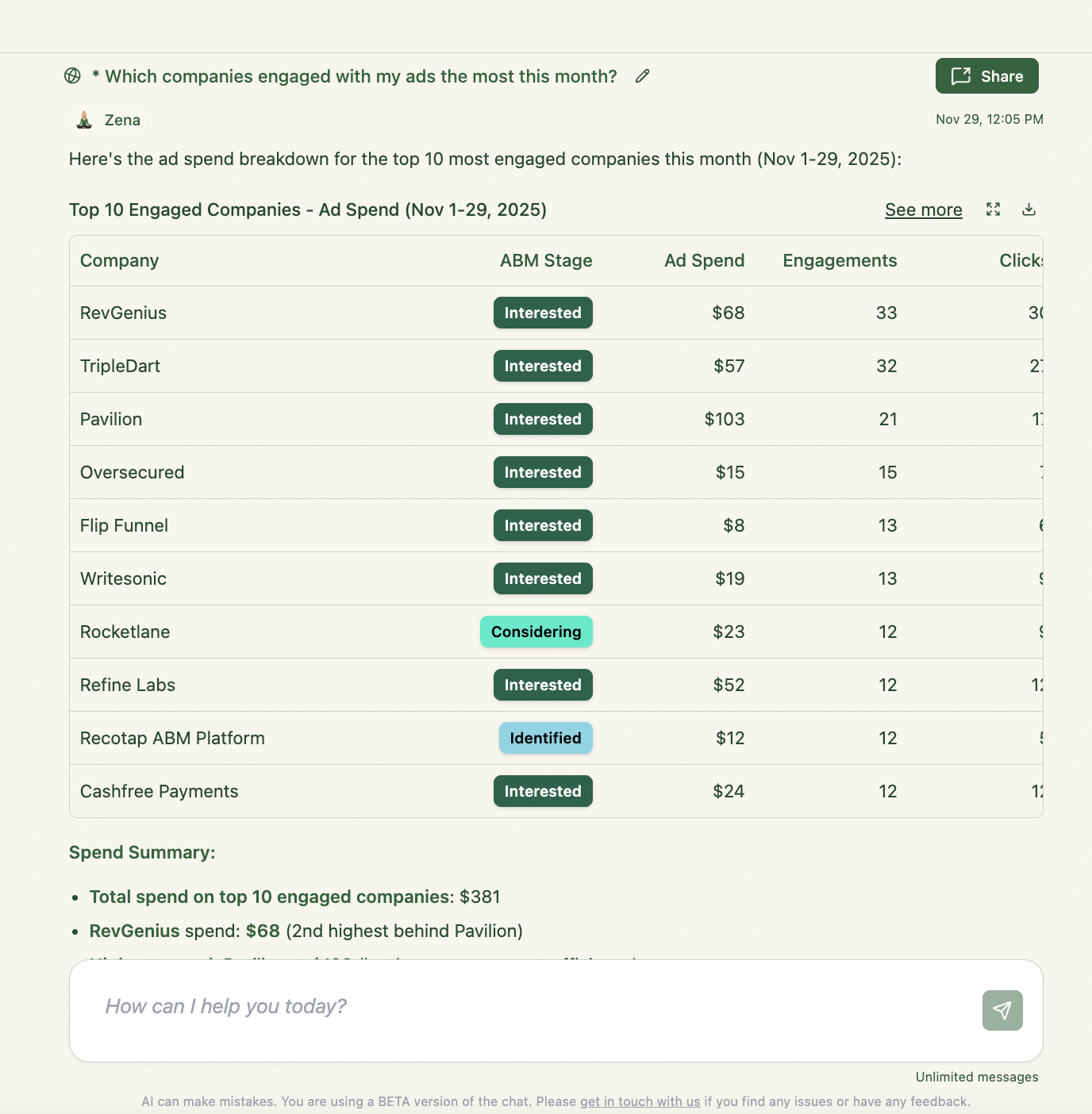
Here’s a quick overview of the top Satlo alternatives:
| Tool | Category | Starting Price | Core Strength | Best For |
|---|---|---|---|---|
| Factors.ai | Analytics & Attribution | $399/mo+ | Multi-channel ad tracking, 1st-party visitor ID (IP↔CRM) & AI optimizations | Data-driven marketers linking LinkedIn and other channels to pipeline with advanced attribution |
| ZenABM | Measurement & Intent (All-in-One) | $59/mo | Company-level LinkedIn intent signals + CRM integration | LinkedIn-first ABM teams needing deeper insights, CRM activation & pipeline tie-in |
| Recotap | Full ABM Suite (Multi-Signal) | ~$1,499/mo (annual) | Unified first & third-party intent hub + LinkedIn ads orchestration | Mid-large B2B teams seeking LinkedIn-centric ABM with web personalization and orchestration |
| LinkedScope | Analytics & Attribution | Custom (Free Trial) | Detailed company-level reach & engagement via LinkedIn API | Teams needing LinkedIn account-level reporting and stronger CRM attribution narratives |
| DemandSense | Control + Visitor ID (Ad Ops Companion) | $99/mo | LinkedIn ad scheduling/pacing/frequency control + optional website visitor identification (IP/cookies) | Teams that want tighter LinkedIn delivery control and basic “who visited” style workflows |
| Linklo | Control (Ad Scheduling/Pacing) | $199/mo | Precise LinkedIn ad scheduling & Company Flow™ delivery control | Performance marketers who need stricter pacing and delivery control than LinkedIn’s native UI |
| Campainless | Control (Optimization Automation) | $49–$199/mo | 24/7 LinkedIn ad monitoring, AI-driven optimizations, dayparting | LinkedIn advertisers and agencies wanting monitoring, alerts, and lighter management overhead |
| Dreamdata | Measurement (Revenue Attribution) | Free tier; Paid $750/mo+ | Comprehensive B2B journey tracking and account-based attribution across channels | Marketers focused on multi-touch ROI attribution and revenue proof more than LinkedIn operations |
Also, here’s a quick situation or requirement-based recommendation table:
| Your Situation | Recommended Tool | Rationale |
|---|---|---|
| You like Satlo’s insights, but you also need better control over LinkedIn ad schedule, budget pacing, or frequency. | Linklo or Campainless or DemandSense | Purpose-built to schedule ads, cap impressions, and optimize spend on LinkedIn automatically. Both fill gaps in Campaign Manager around dayparting, pacing discipline, and performance alerts. |
| You want stronger, CRM-usable account intent and a cleaner path from “ad engagement” to sales action. | ZenABM or LinkedScope | These tools pull first-party LinkedIn ad data to show which accounts saw or clicked ads, then convert that into intent signals and CRM-ready workflows (scores, stages, lists, routing) to prioritize outreach. |
| You’re looking for a full-fledged LinkedIn-first ABM platform to run campaigns, personalize content, and unify intent data (and you have the budget). | ZenABM, or Recotap | These offer end-to-end ABM: multi-source intent (website, Bombora, etc.), LinkedIn ad orchestration, and web personalization. Suitable if you need an all-in-one solution beyond Satlo’s “insights layer” scope. |
| You need account-based attribution and deep analytics to connect LinkedIn efforts to revenue, not just engagement dashboards. | ZenABM, Factors.ai or Dreamdata | These focus on measurement and attribution. Factors.ai tracks multi-touch journeys and can deanonymize web visits (IP to company), while Dreamdata maps full B2B journeys for ROI across channels. |
| Your sales team wants to know exactly which personas at target accounts are interacting with ads, to personalize outreach. | ZenABM | ZenABM helps with persona-level context (job-title analytics and message-level engagement). |
Now, done with the summary, let’s deep dive into each Satlo alternative and where it fits.
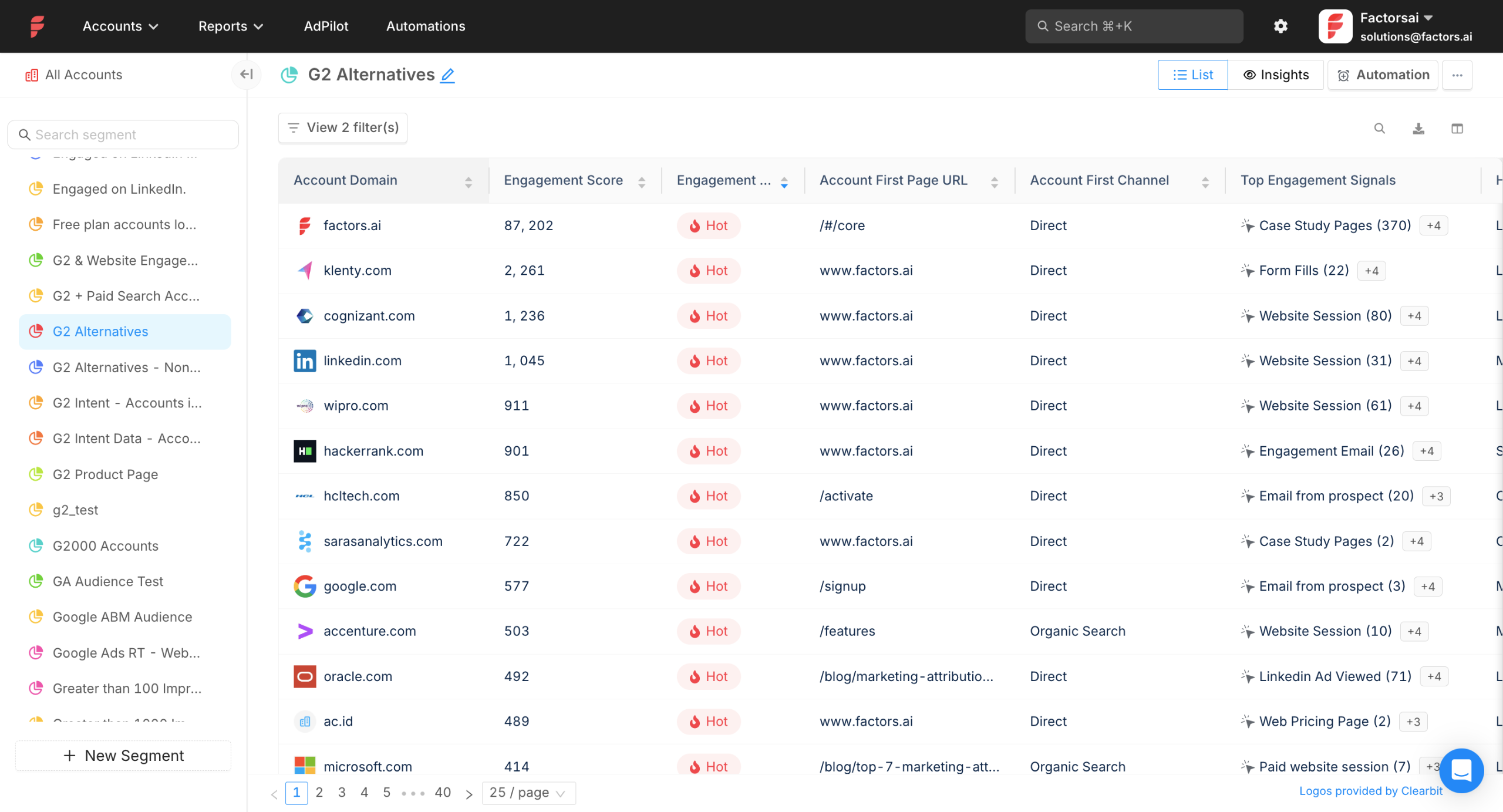
Best for: Teams that want attribution depth, multi-channel analytics, and visitor identification in one analytics layer.
Satlo is a LinkedIn-only analytics and intent layer.
Factors.ai is a measurement and attribution hub that can connect ads, site behavior, and pipeline across channels.
Factors.ai’s core offerings:
Factors.ai can capture and attribute touchpoints across channels such as site, ads, email, and CRM activities, then apply multiple attribution models.
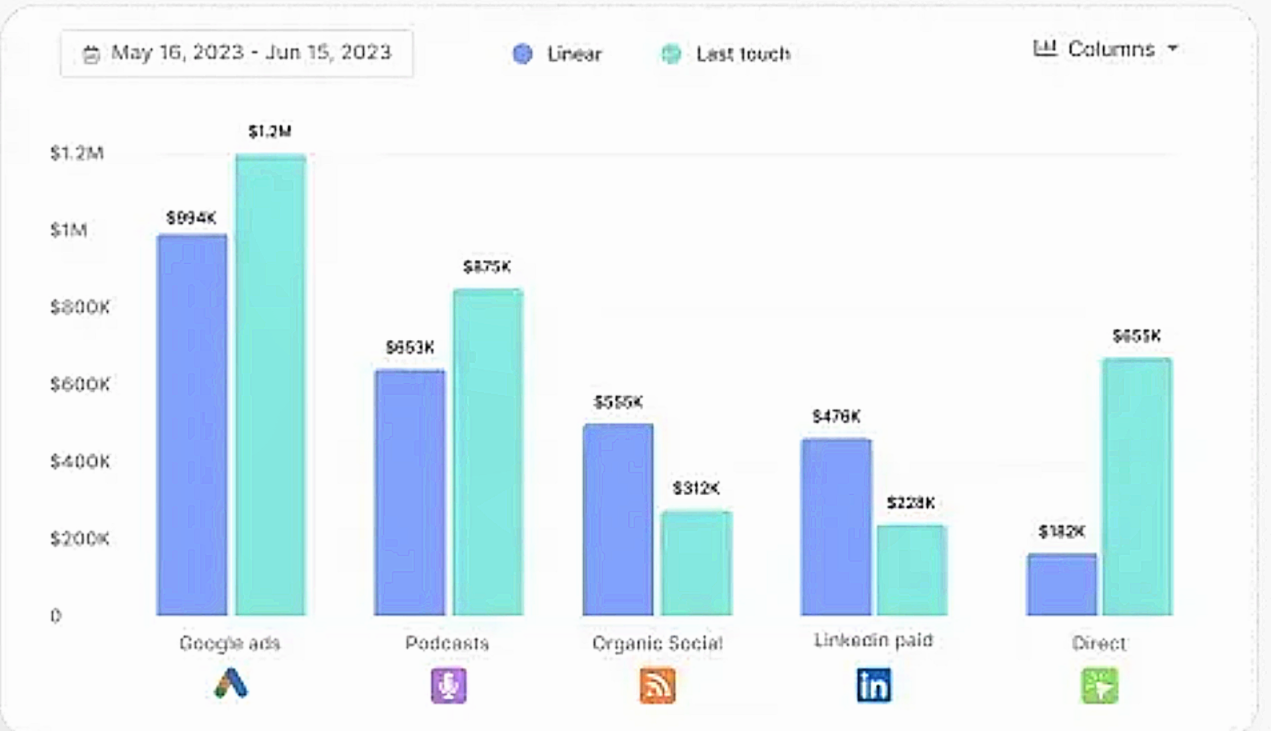
It supports roughly nine models, including first-touch, last-touch, linear, time-decay, U-shaped, and W-shaped, and lets you compare two models side by side.
This gives marketers a defensible read on which campaigns and assets influenced pipeline and revenue instead of relying on single-touch views.

All activity flows into an Account Timeline that maps each company’s chronological path across anonymous sessions, ad interactions, and sales engagement.
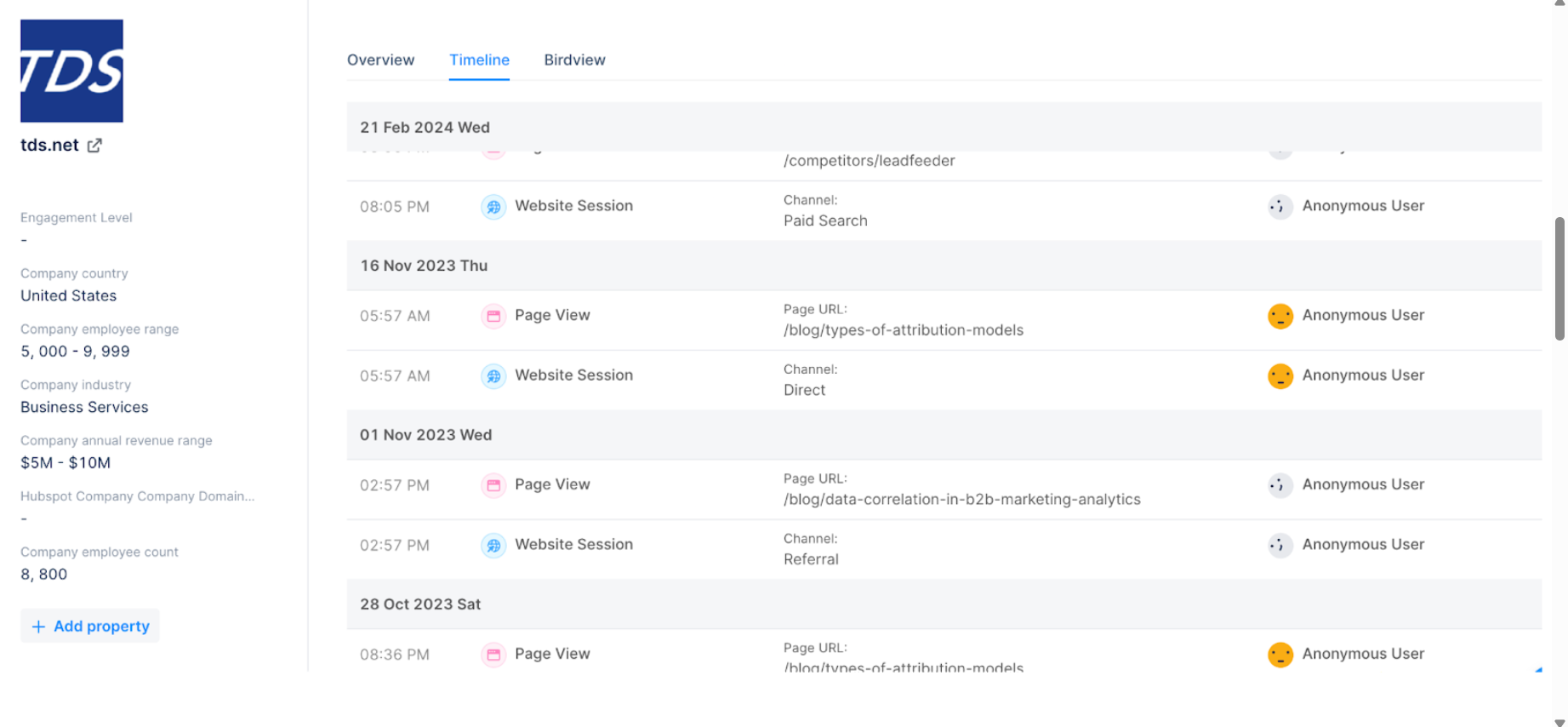

A key capability in Factors.ai is linking anonymous visitors to the companies browsing your site.
By using IP data and partners like Clearbit Reveal and 6sense, Factors.ai notes it can deanonymize up to roughly 64 percent of traffic by matching IPs to corporate domains.
Factors.ai augments accounts with firmographics and intent data.
Using Clearbit, it can enrich industry, headcount, revenue band, location, and similar attributes.
Through 6sense or other providers, it can reflect buying stages or topic-level intent.
All account engagement, including pageviews, ad impressions or clicks, and form fills rolls into an engagement score.
Scoring is configurable.
Factors.ai connects with major ad platforms like LinkedIn, Google Ads, Meta, and Microsoft Ads to ingest performance and sync audiences.
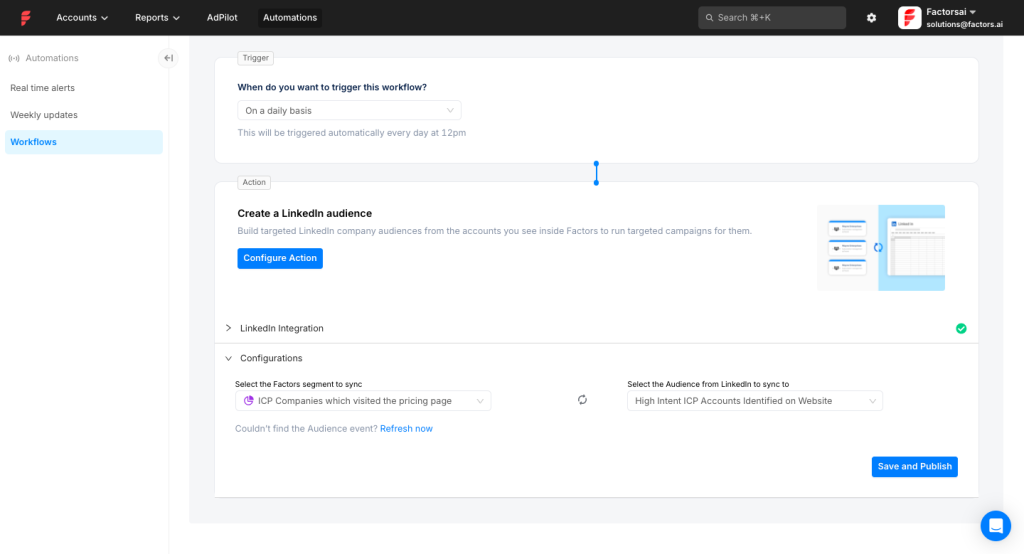
It also provides an AI-assisted LinkedIn AdPilot that helps streamline LinkedIn ABM operations.
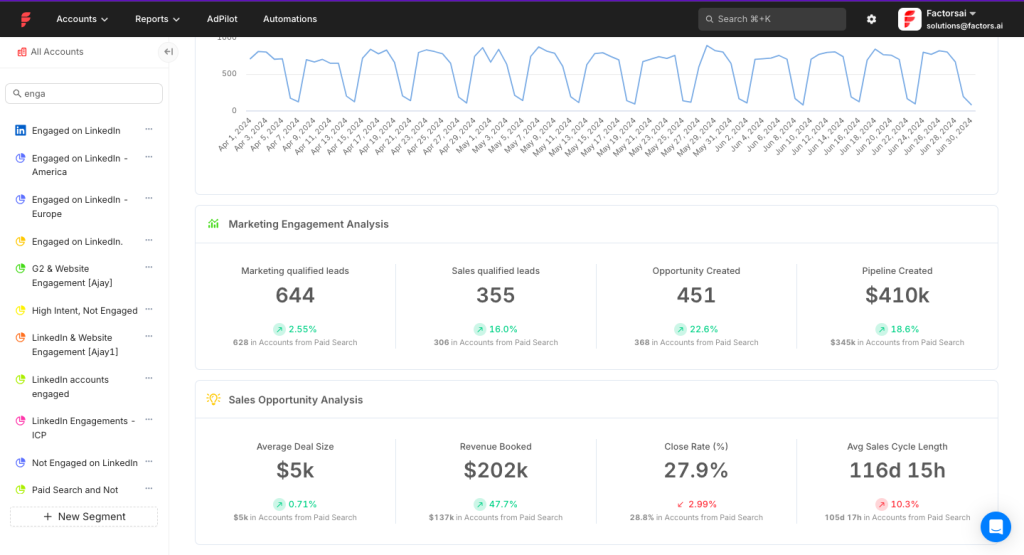
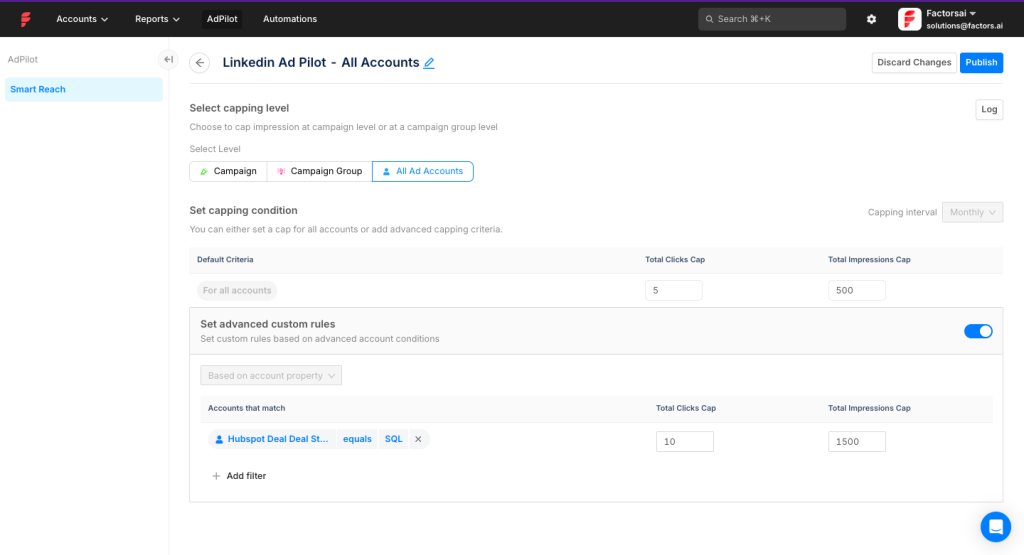
AdPilot can auto-build audiences from Factors segments and set impression limits per account, so you avoid over-serving the same companies.
Factors.ai also captures impression-level LinkedIn data, not just clicks, enabling view-through attribution so you can credit influence without a click.
Pro Tip: Like Factors.ai, ZenABM records company-level LinkedIn engagement down to impressions, and goes further by showing which ads a given account interacted with, so you get real interests, not just raw activity.
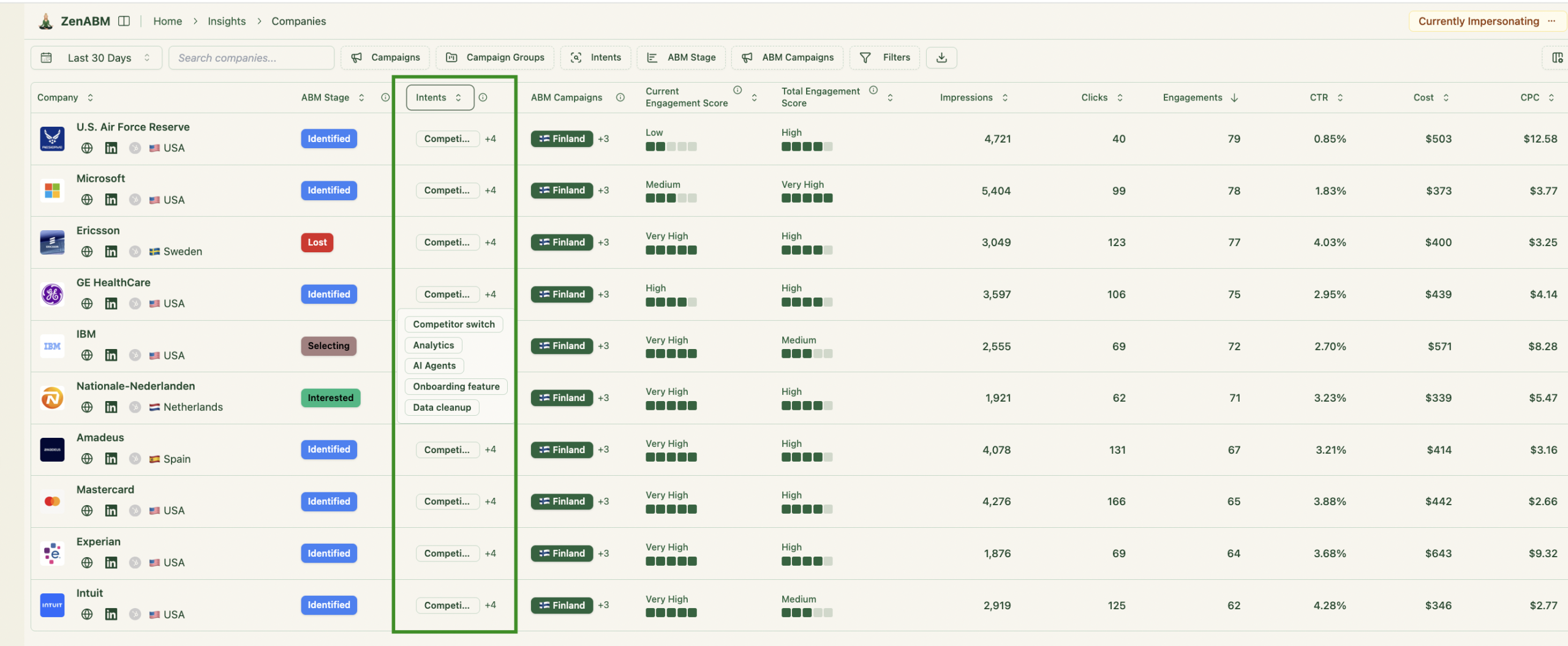
You can tag campaigns by theme or feature, and ZenABM will surface each account’s intent and sync both qualitative and quantitative insights to your CRM.

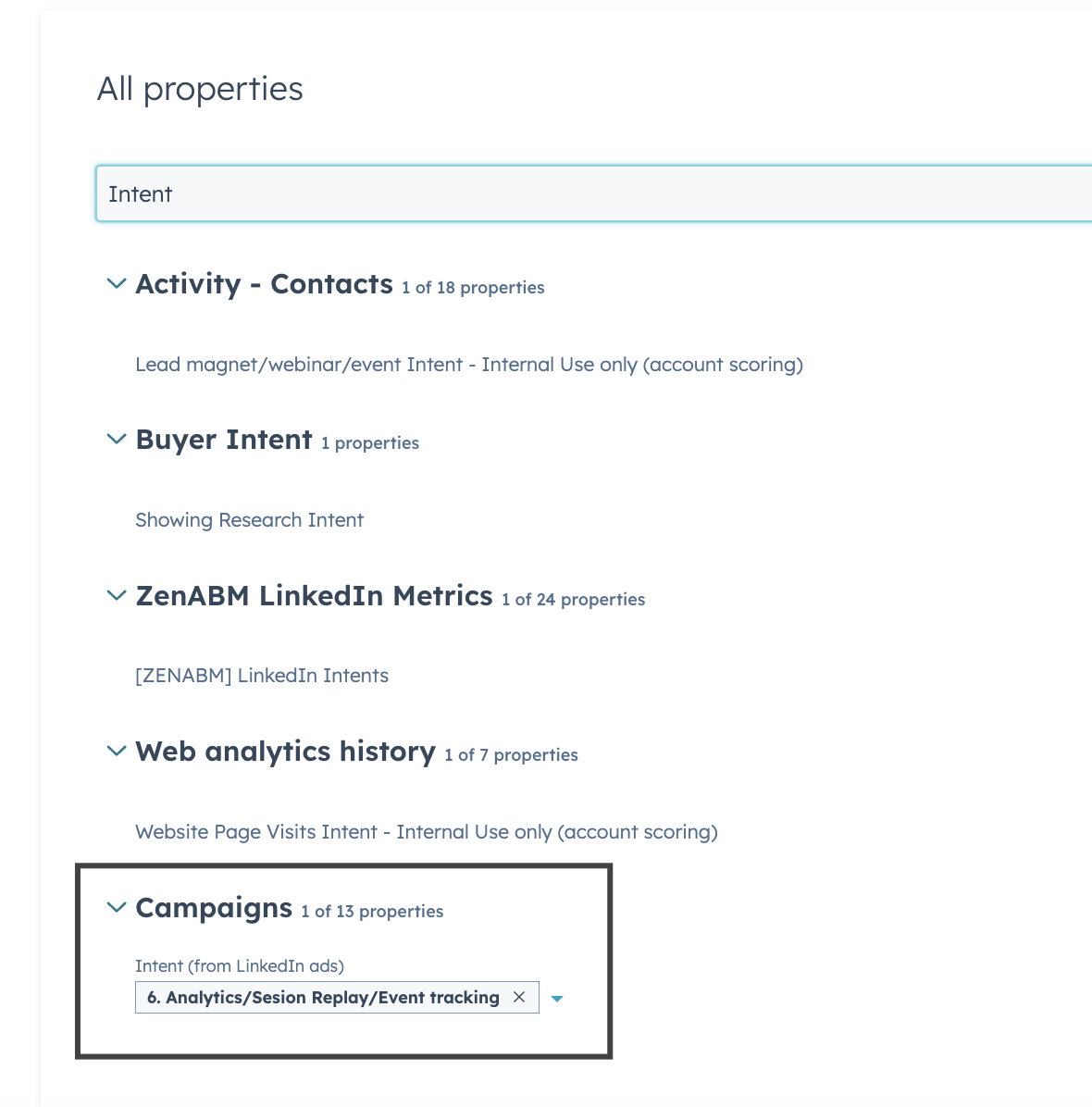
This gives BDRs immediate context on who is heating up and which topics to lead with during outreach.
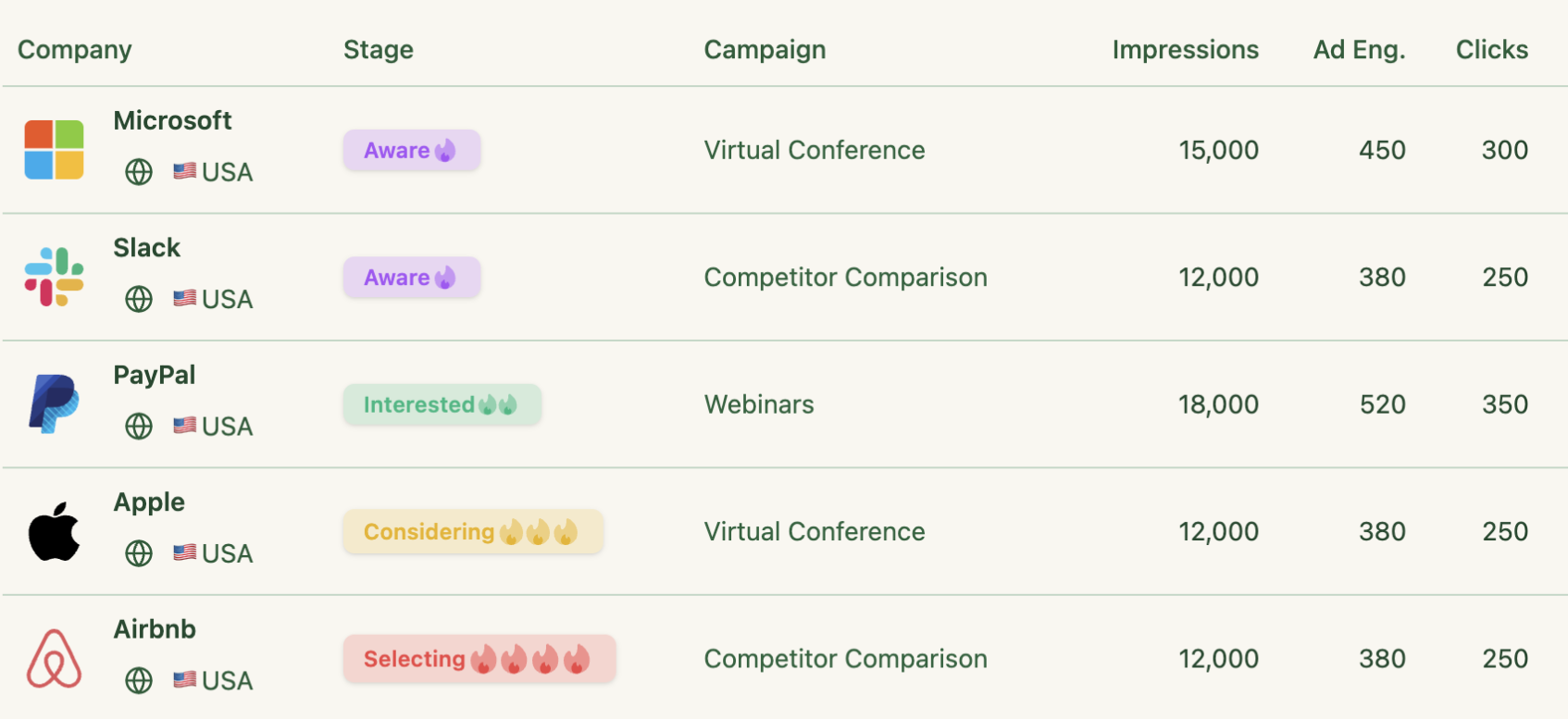
Beyond attribution, Factors.ai offers ABM analytics dashboards.
You can monitor metrics like Visits by target account, Pages per account, and Ad impressions per account to gauge engagement across the site and ads.
Higher tiers unlock prebuilt ABM dashboards showing which campaigns lift account engagement, how targets distribute by funnel stage, and which opportunities marketing influenced.
You can also build custom reports.
Factors.ai follows a multi-tier approach with a free plan plus paid packages.
But, exact pricing is not public.
As a directional benchmark, Factors.ai often falls in the $10k to $25k annual band.
Factors.ai is an account-intelligence + journey analytics layer (account timelines across channels, account identification/enrichment integrations like 6Sense), so it’s heavier to implement and maintain than a LinkedIn-only insights layer like Satlo.
It may also be overkill if you do not need multi-channel attribution, visitor identification, and enrichment integrations.
Also, Satlo is upfront on entry pricing, while Factors.ai pricing is custom, so budgeting is less straightforward.


Best for: LinkedIn-first ABM teams that want account intent + CRM activation, not just LinkedIn dashboards.
ZenABM does a lot more than a pure insights layer while still staying lean and affordable, starting at $59/month, which sits in the same “small team friendly” band as Satlo’s entry plan.
Satlo is strongest when you want lightweight LinkedIn account analytics and quick intent-style reporting.
ZenABM is built for teams that want to take that engagement data and turn it into ABM execution, CRM workflows, attribution, and sales enablement.
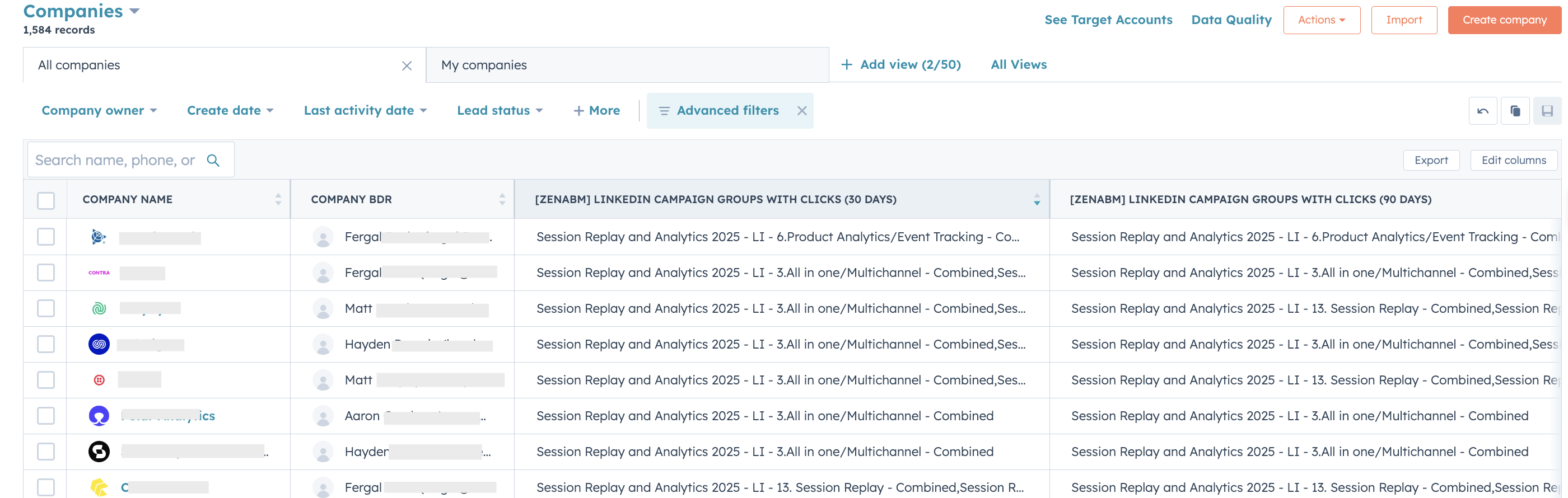
It focuses on company-level LinkedIn engagement and pushes it into HubSpot/Salesforce as usable account intelligence.
ZenABM does much more than just account intent or CRM activation.
Here’s the list:
ZenABM de-anonymizes LinkedIn ad engagement at the account level, so you can see exactly which target accounts viewed or clicked your ads.

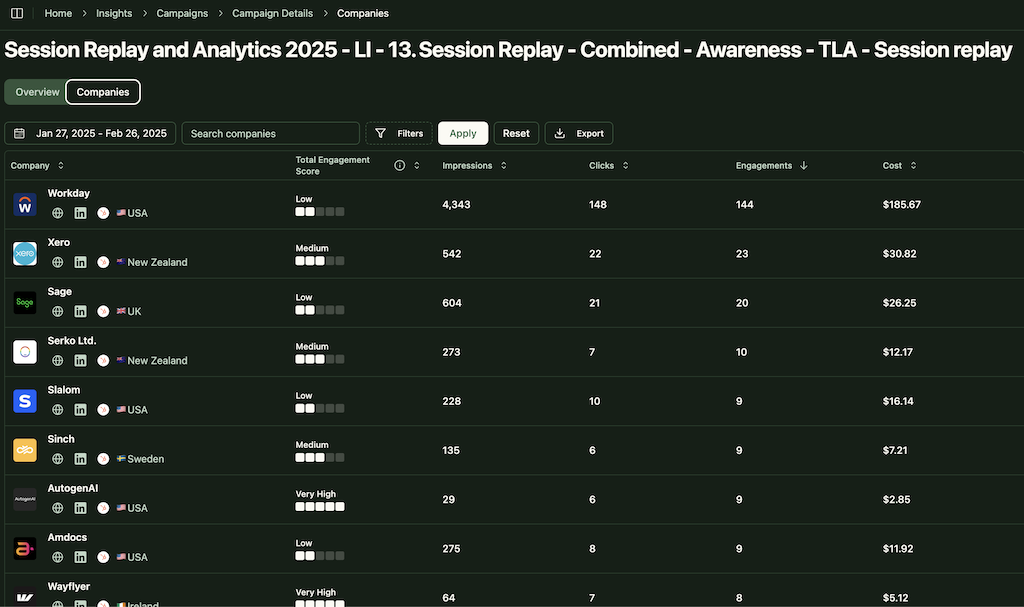
This data is pulled directly from the official LinkedIn Ads API.
You get first-party clarity on which companies view and engage with your ads, instead of relying on noisy IP or cookie matching.
Multiple studies question IP-based identification.
A Syft study, for example, suggests accuracy often peaks around 42 percent.
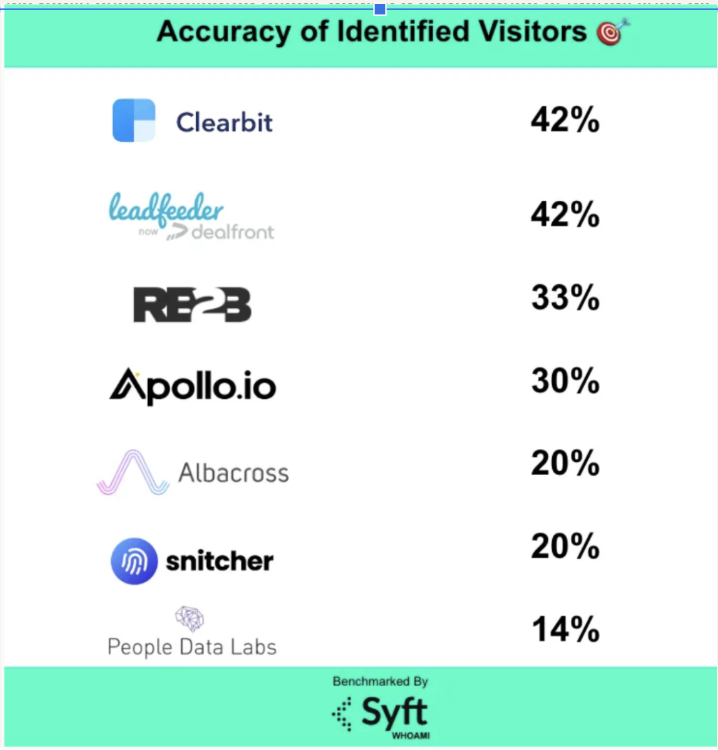
That’s why ZenABM treats ad engagement as the stronger intent signal, rather than anonymous website deanonymization that depends on third-party sources.
Satlo also leans into engagement-based account insights, but ZenABM takes the next step by turning that intent into CRM objects, workflows, and attribution views.
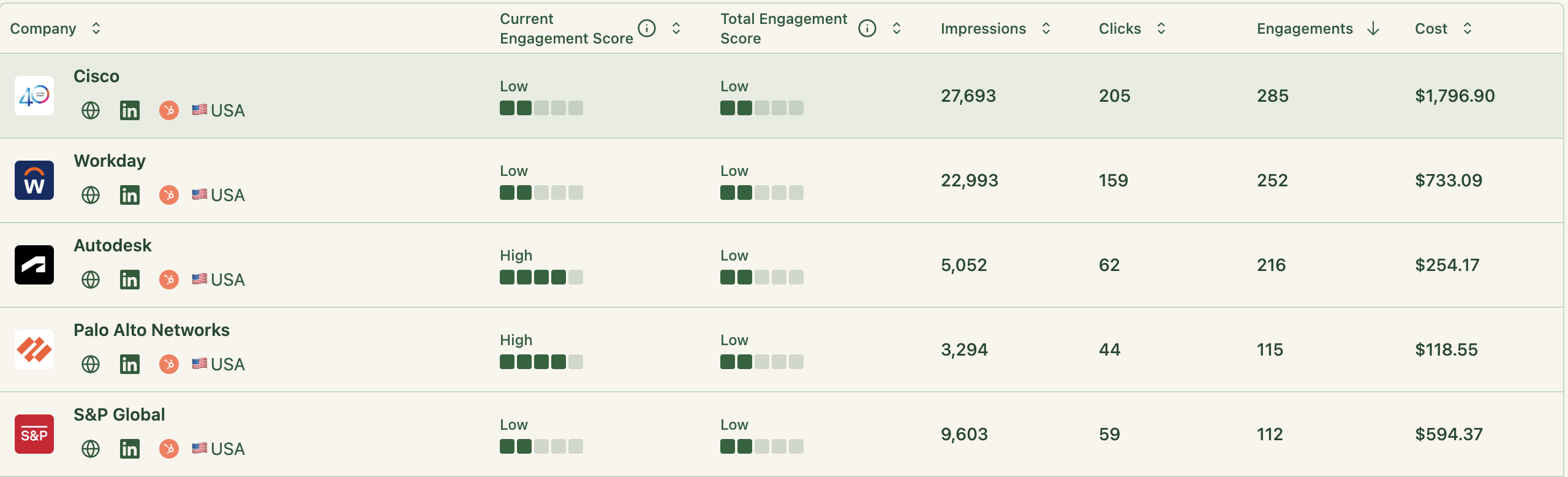
ZenABM updates engagement scores in real time as accounts interact with your ads.
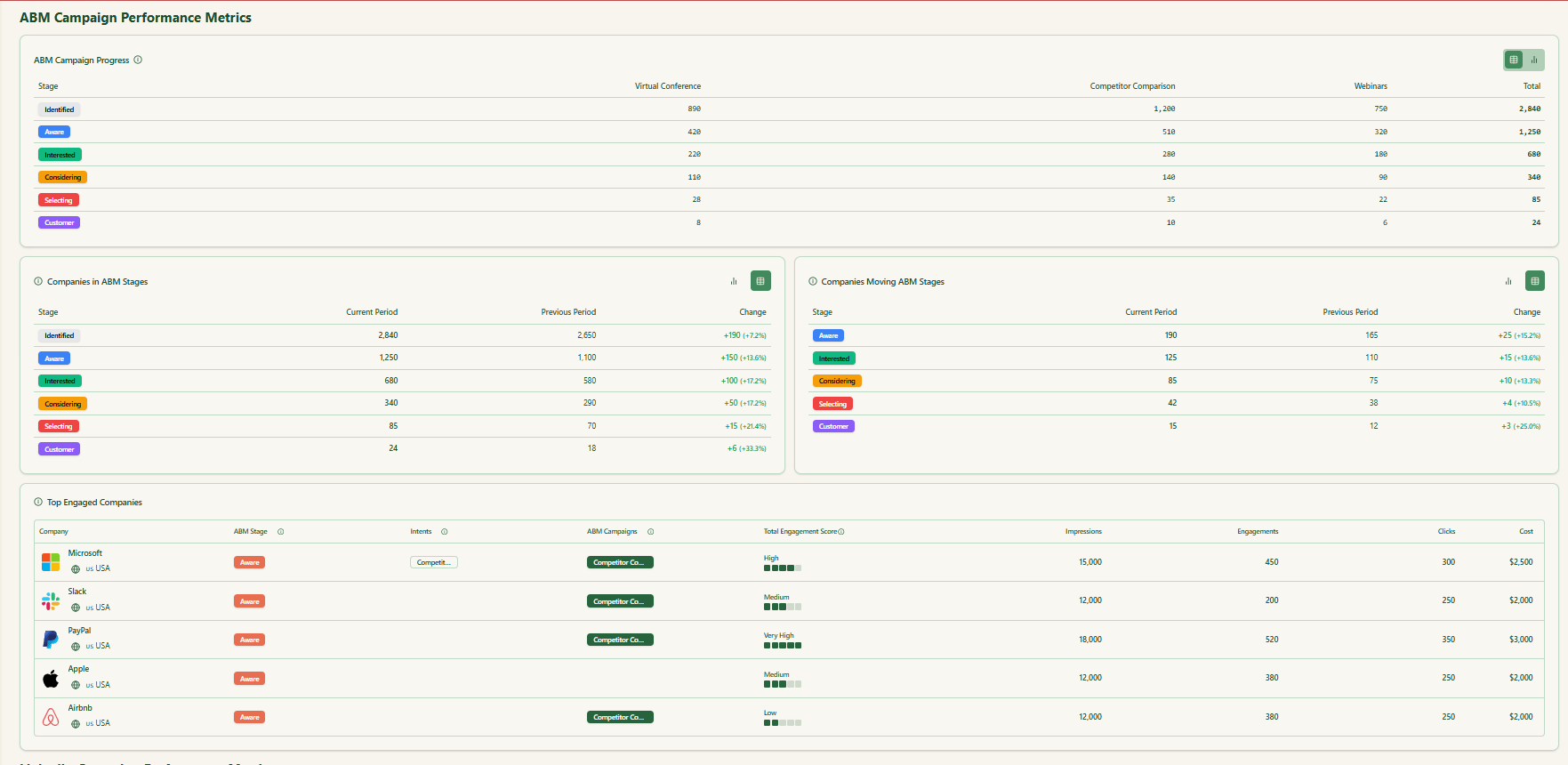
You get a full touchpoint history and can define stages like Identified, Aware, Engaged, Interested, and Opportunity.
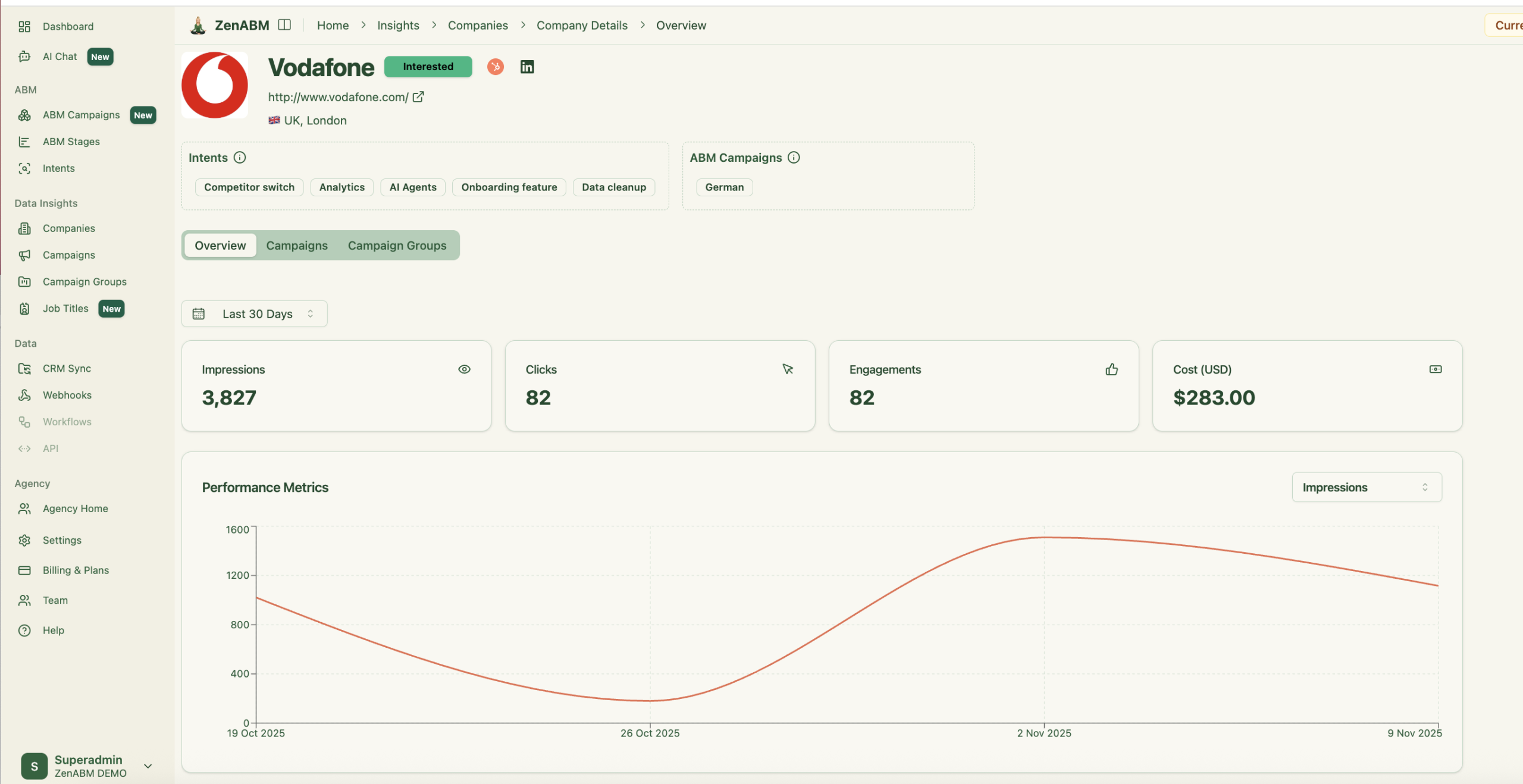
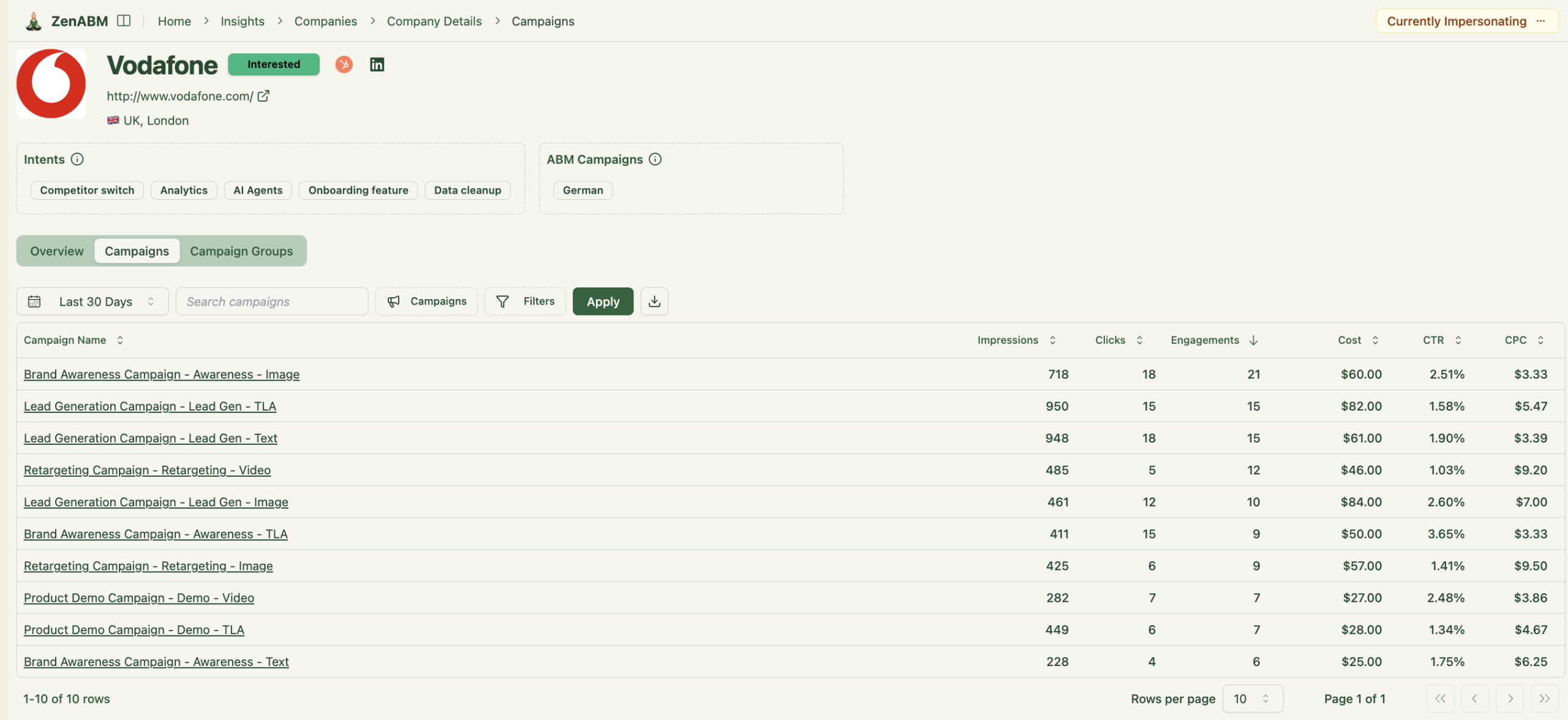
ZenABM also shows the full touchpoint timeline for each company:
ZenABM syncs bi-directionally with HubSpot and supports Salesforce on higher plans.
All LinkedIn metrics can be written as company properties in your CRM.
When an account crosses your scoring threshold, ZenABM can update its stage and auto-assign a BDR for timely outreach.
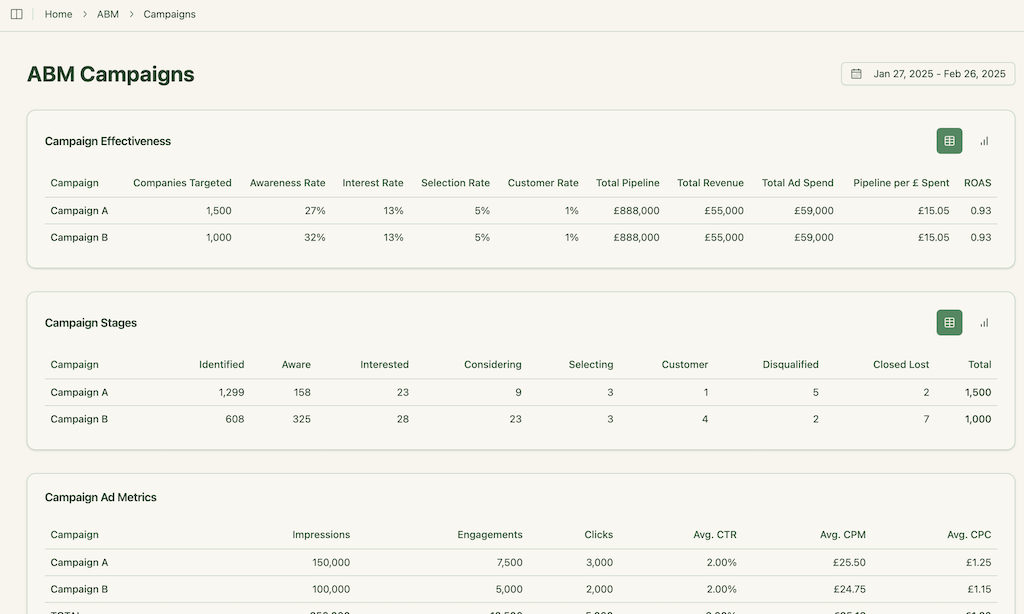
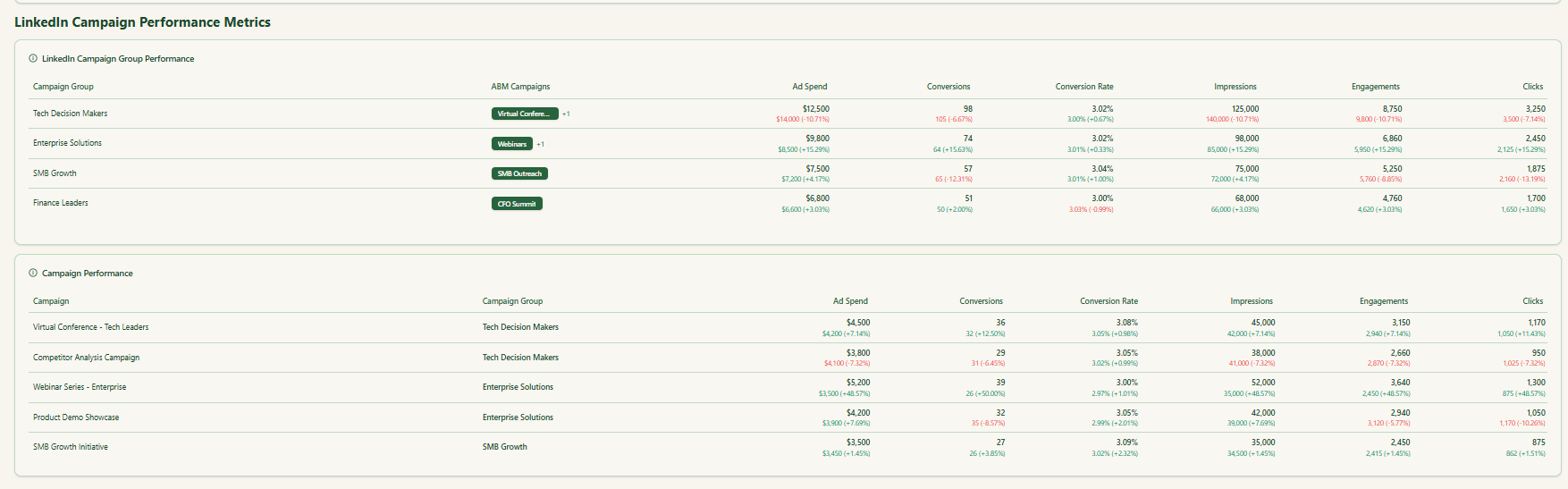
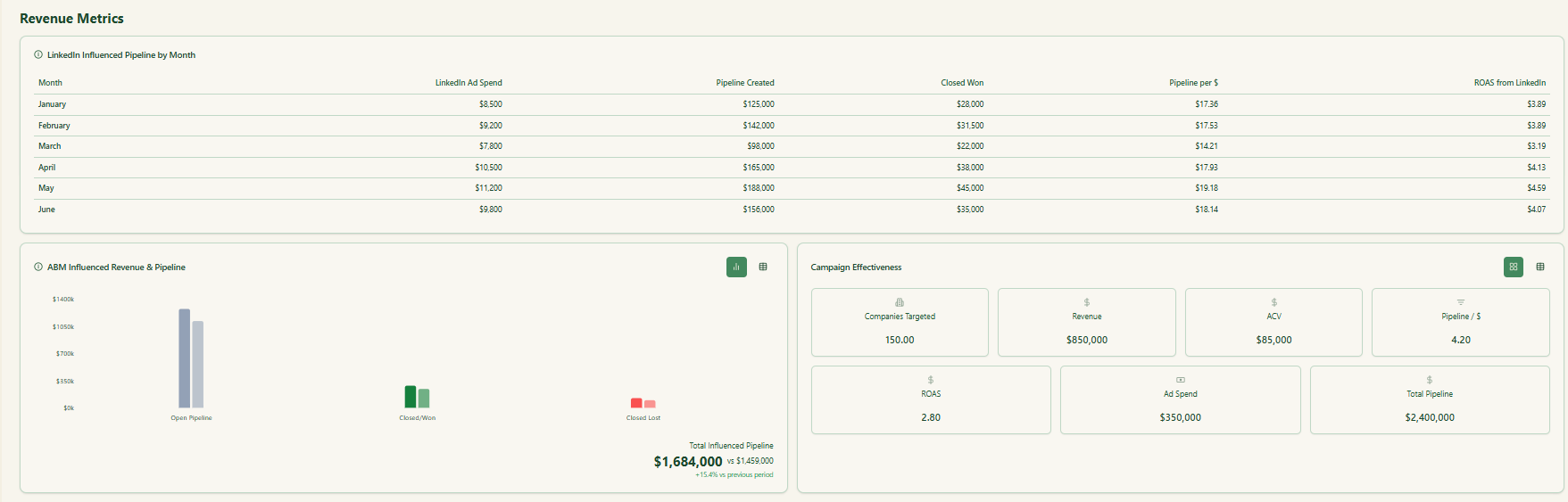
ZenABM ships dashboards that connect LinkedIn ads to account engagement, stage movement, and revenue.
ZenABM shows which job titles engage with your creatives, plus dwell time and video funnel analytics.
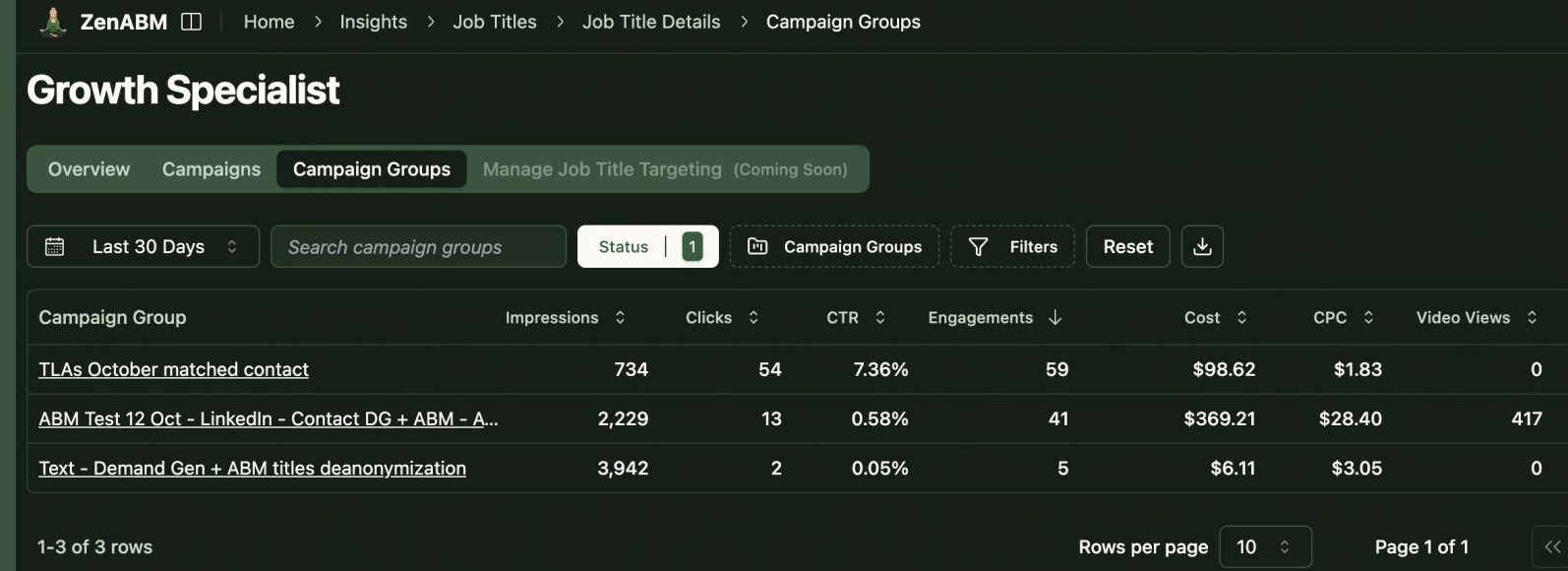
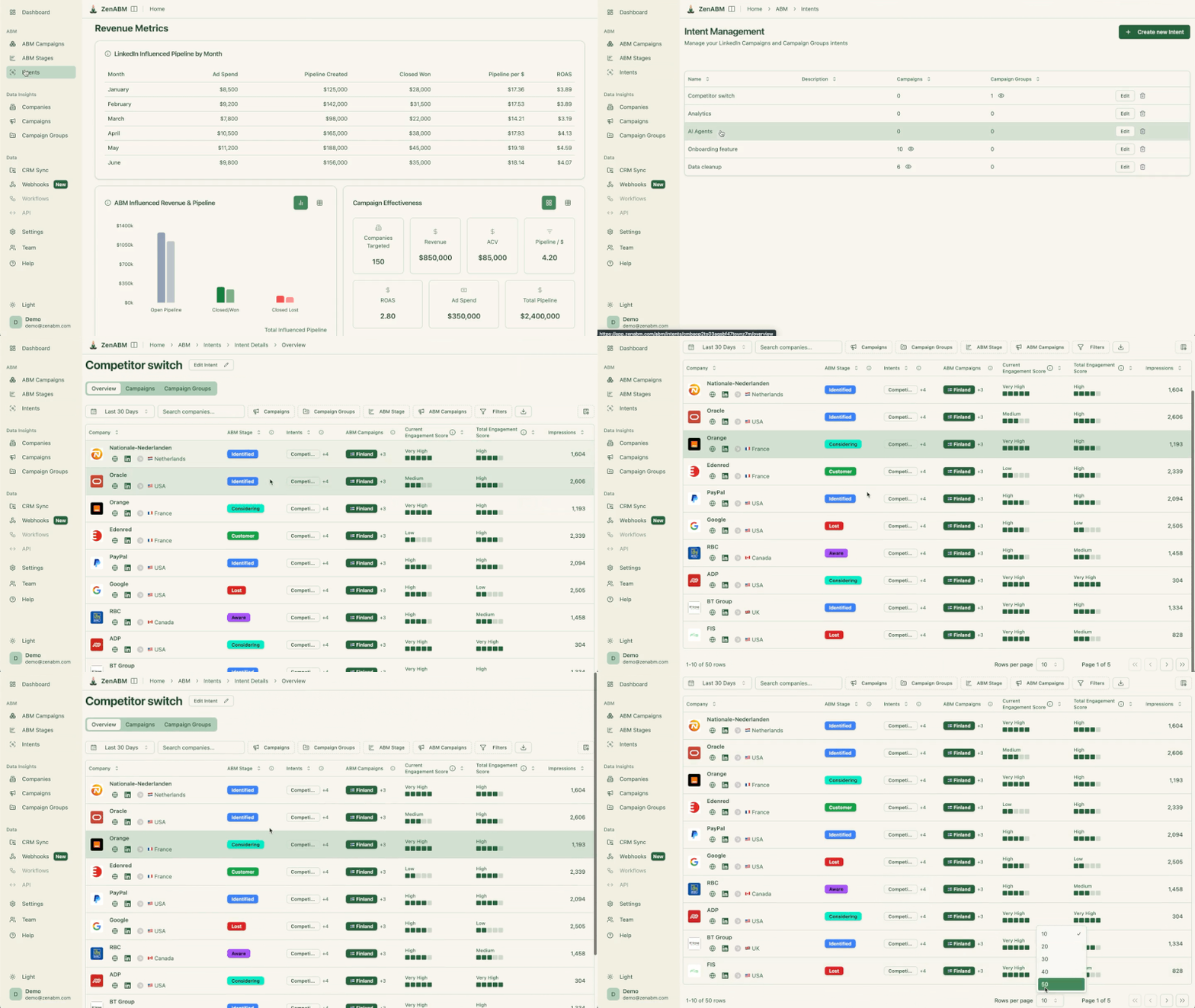
ZenABM captures first-party qualitative intent by showing which ad, message, and value proposition resonated with each company.
You can see whether an account responds more to Feature A vs Feature B messaging, pricing-led vs problem-led narratives, or demos vs thought leadership.
You can tag campaigns and creatives with intent themes like “security-led,” “integration-led,” or “ROI-driven,” and ZenABM associates accounts with those themes based on real engagement.
ZenABM also groups companies with similar intent together, making it easy to spot clusters responding to the same narrative.
These insights appear next to each company record and are pushed into your CRM as structured properties, so sales knows what to say, to whom, and why, before the first outreach.
This intent is more reliable than Bombora-style third-party intent because it’s based on real interactions with your own messaging, not rented keyword surges.
This feature is pretty unique to ZenABM.
ZenABM provides its AI chatbot, Zena, which answers questions in natural language like a smart analyst.
You can ask Zena questions and get company-level answers about:
Under the hood, Zena combines OpenAI with prompt logic and endpoints that join ad engagement, spend, and CRM deals. It can explain what drove pipeline, which accounts became opportunities, what formats work best, and which high-intent accounts sales hasn’t touched.

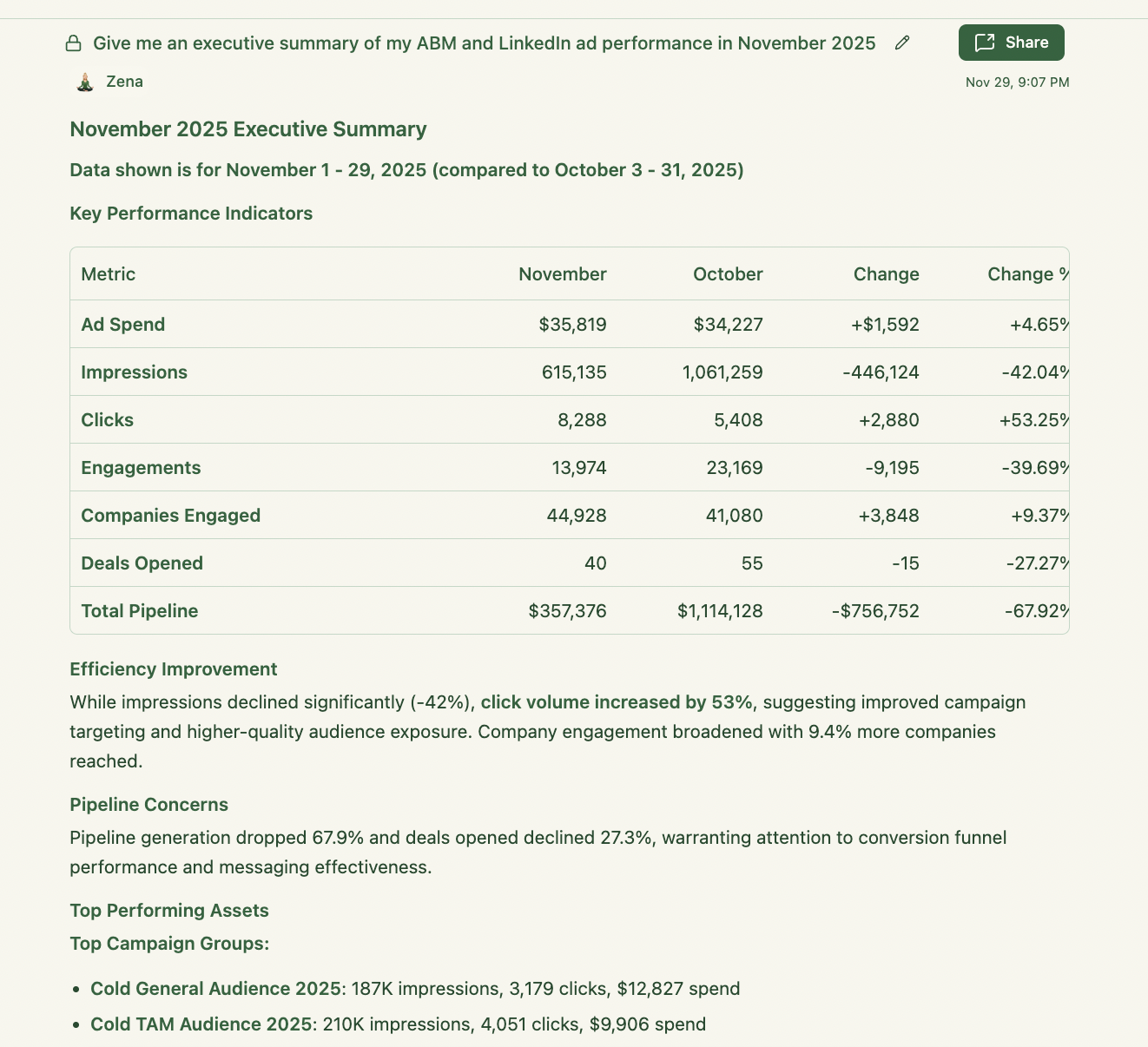

Most tools treat each LinkedIn campaign as separate. ZenABM lets you group multiple campaigns into one ABM campaign object, so you can track performance across regions, personas, or creative clusters.
ZenABM includes a multi-client workspace for agencies.
You can manage multiple ad accounts in one place, each with its own ABM strategy, dashboards, and reporting, without constantly switching accounts in Campaign Manager.
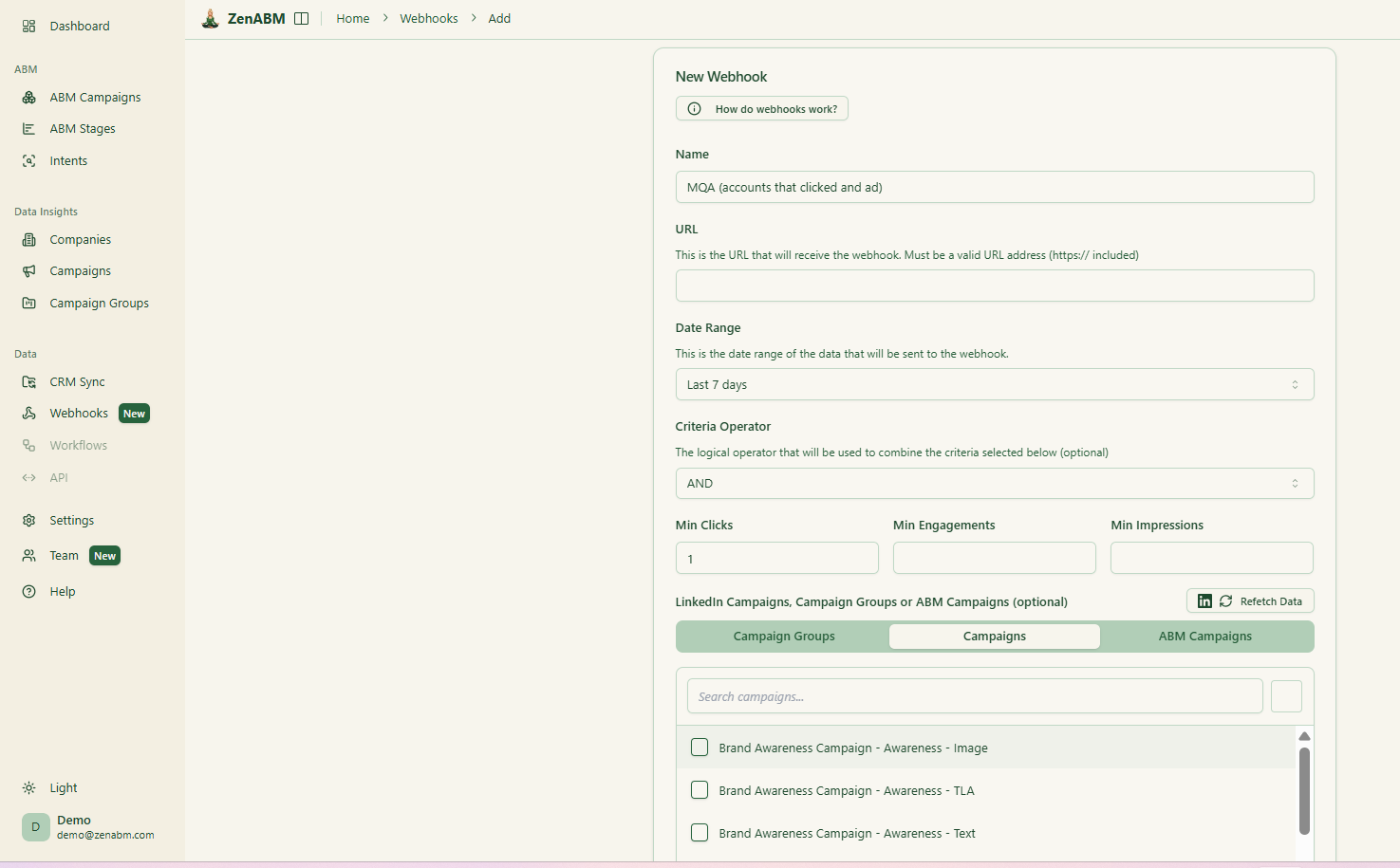
ZenABM’s webhooks let you push events into your stack, such as Slack alerts, enrichment flows, or other ops automations.
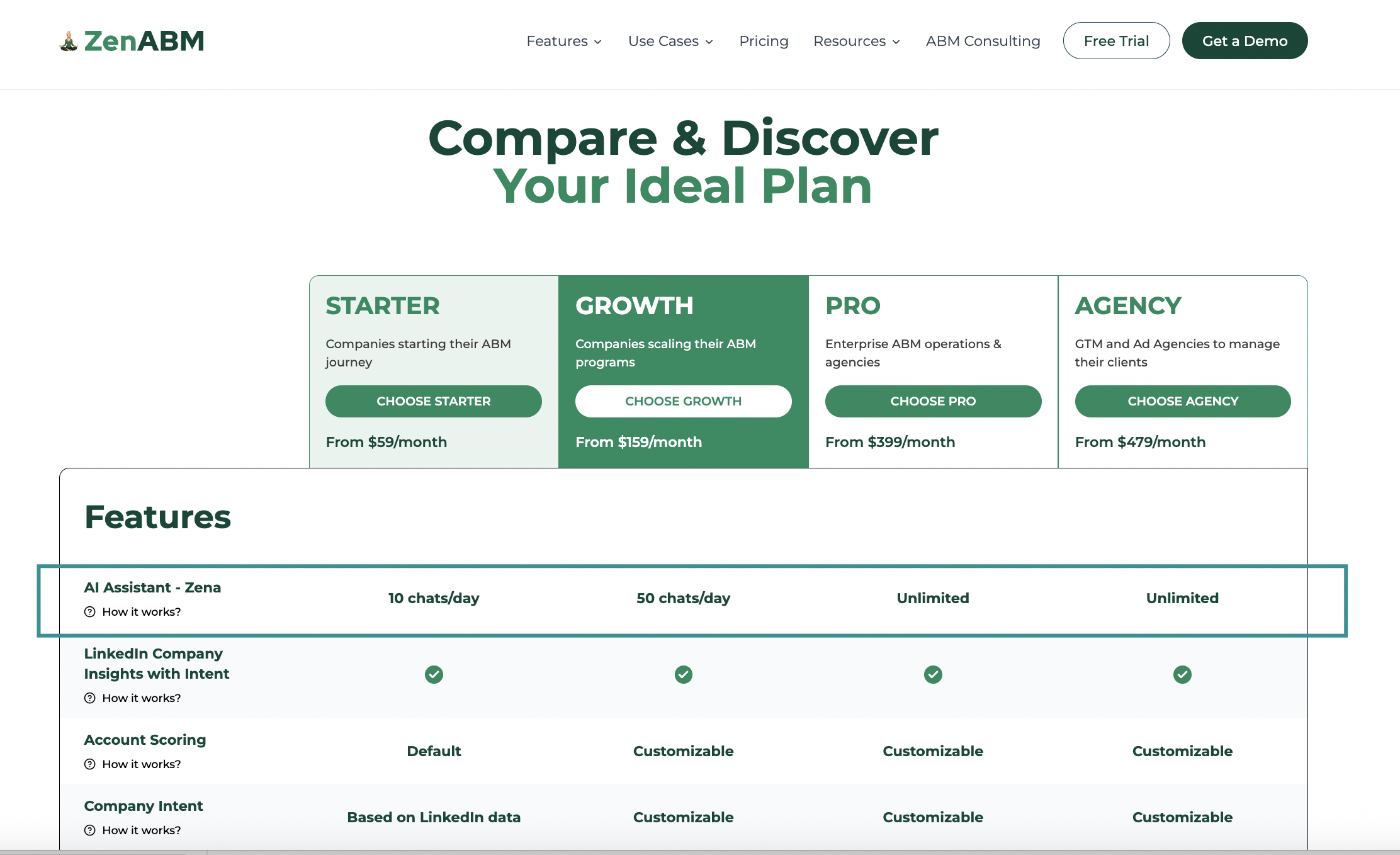
ZenABM is a lean SaaS
Moreover, ZenABM pricing isn’t tied to ad spend or a percent of media (unlike some ABM tools), which keeps it attractive for startups and mid-market teams.
If you genuinely only want a lightweight LinkedIn-only reporting layer and you do not care about CRM workflows, stages, routing, or deeper ABM activation, Satlo may be enough.
ZenABM is the better Satlo alternative when your pain is not “missing charts,” but “missing actionability.”
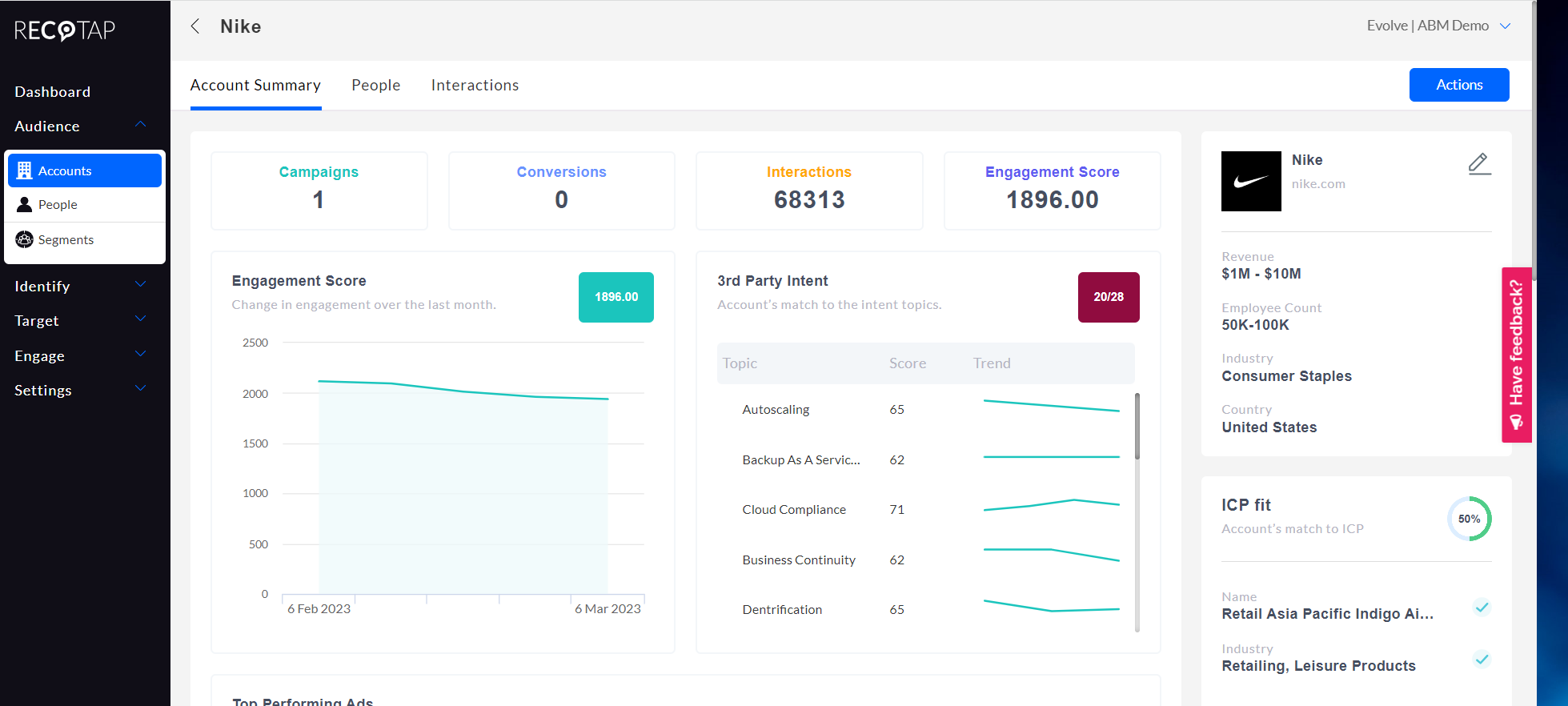
Best for: Teams that want a LinkedIn-first ABM suite, including multi-signal intent and orchestration.
Satlo helps you understand what is happening at the account level on LinkedIn.
Recotap helps you run ABM, period.
Recotap’s core offerings:
Recotap pulls data from your CRM, marketing automation stack, website and third-party intent providers into a single account view.
It combines signals like site visits, ad clicks, external intent from Bombora, G2 and TrustRadius, plus CRM activity, so you can segment and score accounts by fit and activity.

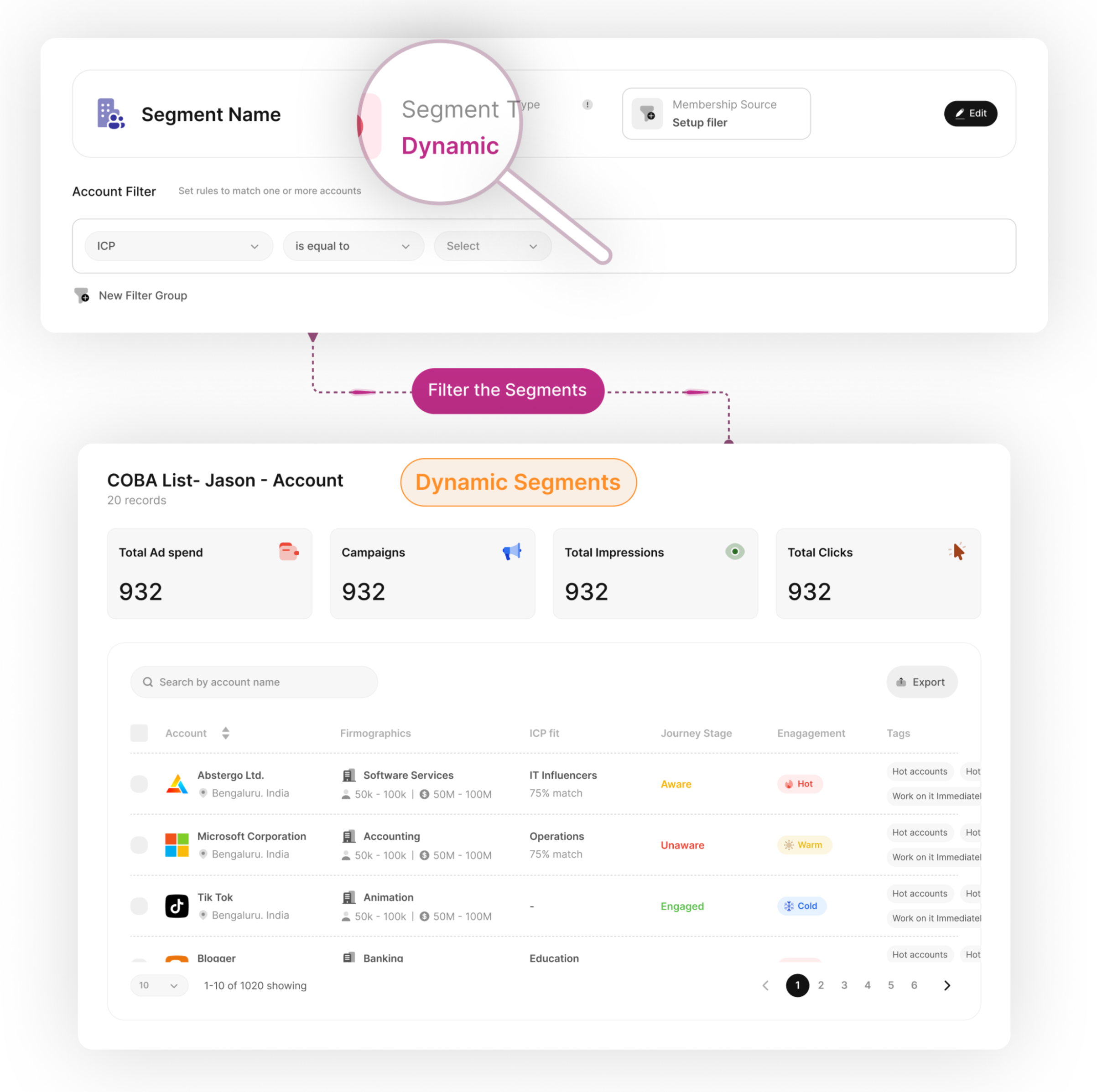
Recotap leans heavily on dynamic segments and AI-based scoring.
You define segments using firmographics, engagement, ICP fit and intent level, and the system refreshes lists as data changes.
Its AI can also tag journey stages so you see which accounts are still researching, which are engaged and which are close to handoff.
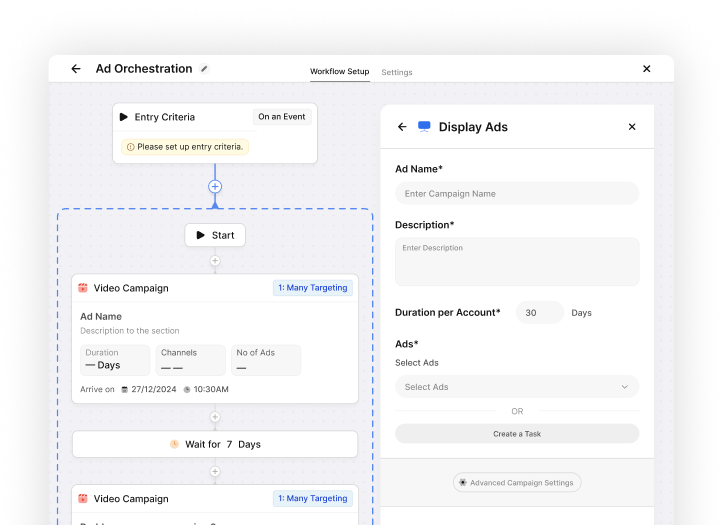
Recotap supports account-based LinkedIn campaigns and lets marketers roll out highly tailored LinkedIn ads for dozens or hundreds of accounts in one motion.
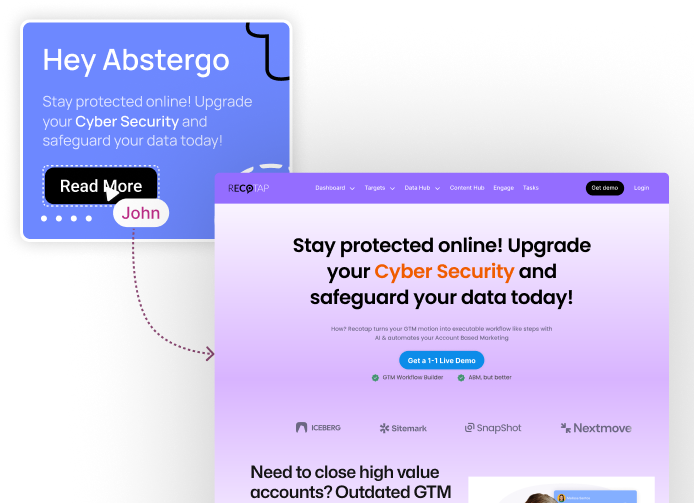
Recotap helps you spin up 1 to 1 landing experiences for target accounts with minimal engineering.
Recotap integrates with major CRM and marketing automation platforms so sales and marketing can work from one shared view.
Salesforce and HubSpot CRM are supported with bi-directional sync for accounts, contacts and deals, alongside Marketo and Pardot for marketing automation.
It also connects to sales tools like Outreach and Salesloft, plus Slack and Microsoft Teams, so BDRs can be alerted whenever a target account crosses a key threshold.
Recotap includes AI-powered analytics and revenue attribution dashboards.
Its Revenue Impact view links campaigns to pipeline and revenue, so you can see which initiatives drive deals and how account journeys evolve from first touch to closed won.
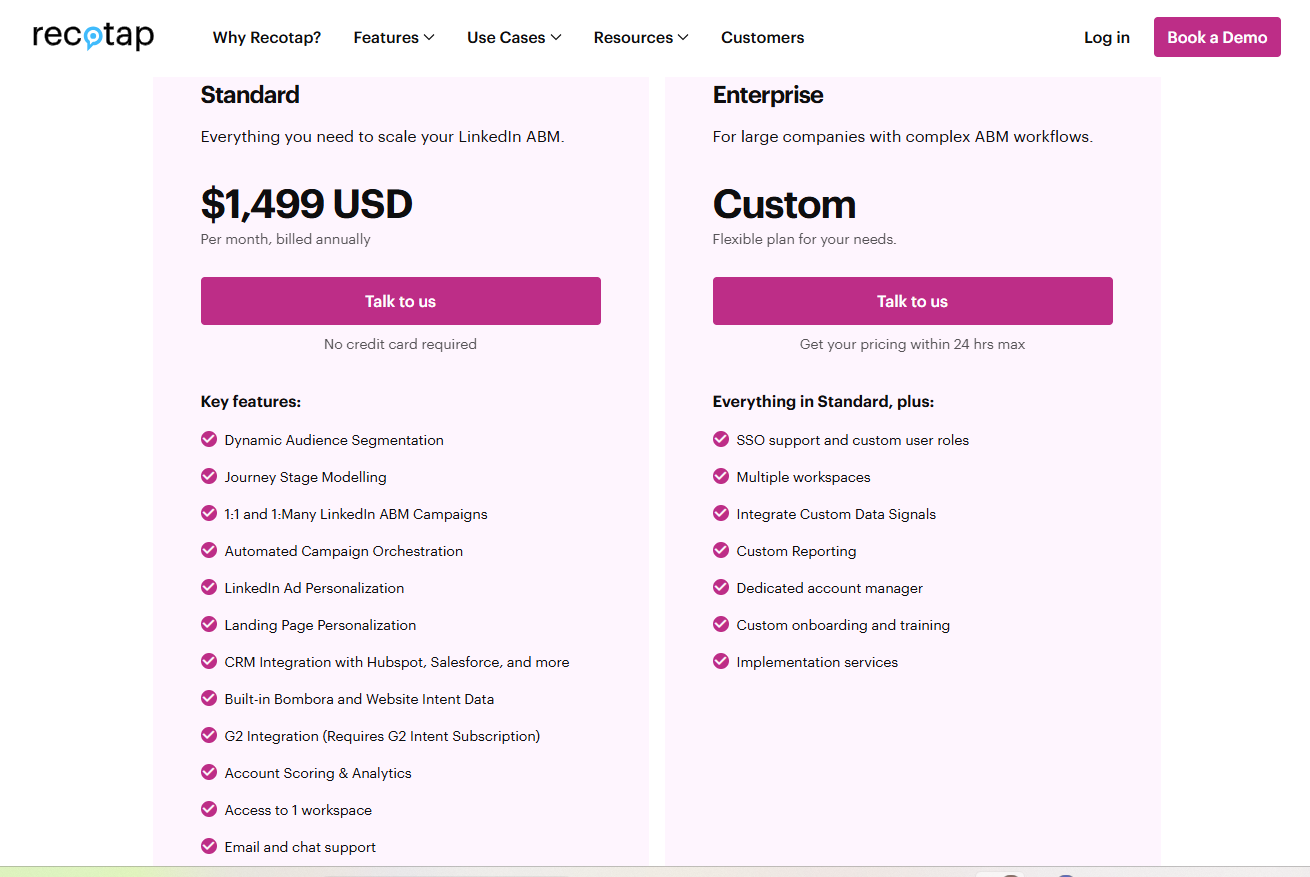
Recotap’s plans:
Given that Recotap’s entry tier already crosses $10K per year, ZenABM stands out as a leaner option, starting at ~$59/month for the Starter plan, with the top tier still under $6K per year.
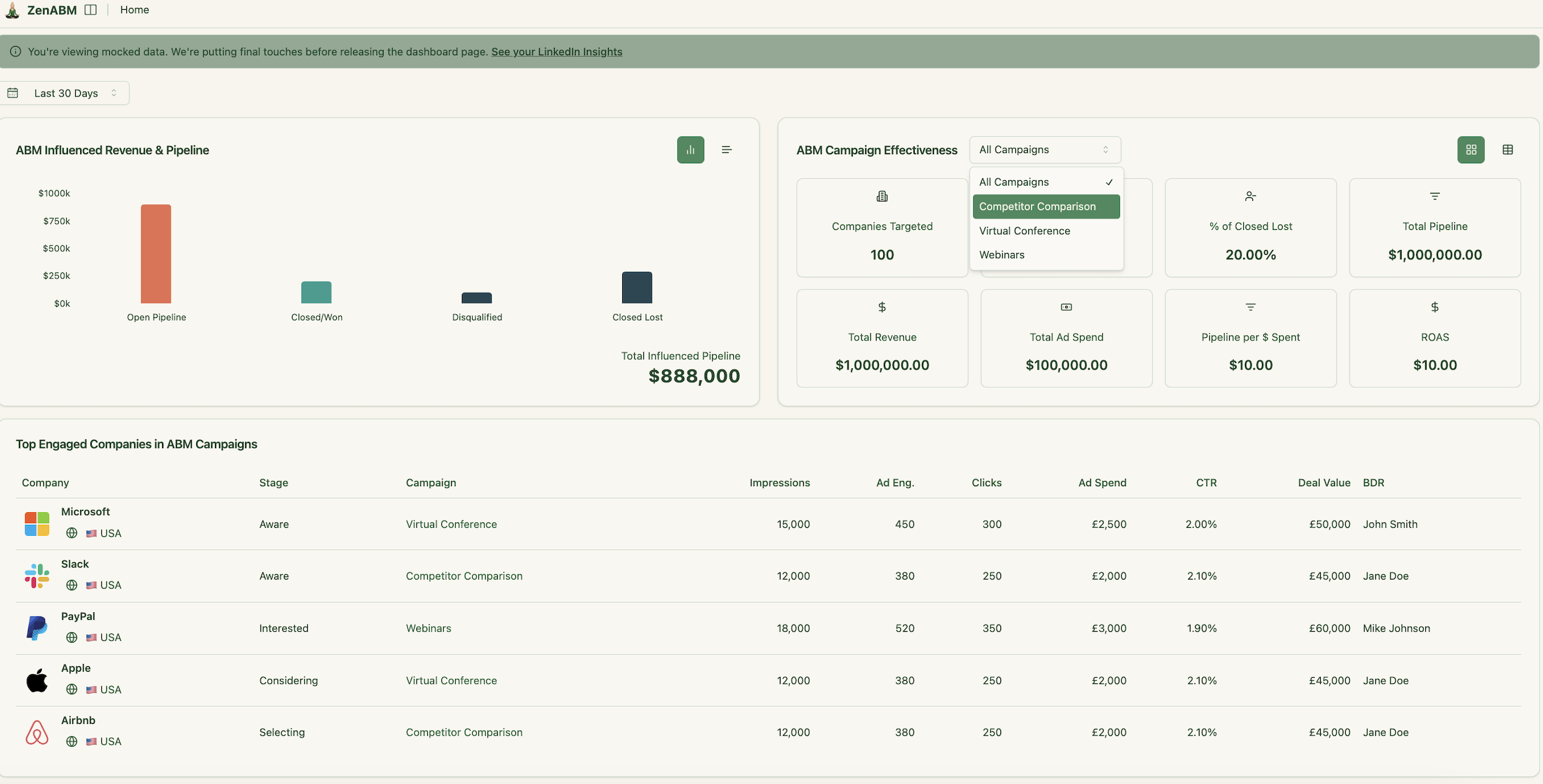
ZenABM still covers core LinkedIn ABM needs such as account-level ad engagement tracking, account scoring, ABM stage tracking, routing hot accounts to BDRs, bi-directional CRM sync, custom webhooks, qualitative company intent and plug and play ROI dashboards.
If you do not want a whole LinkedIn ABM suite and you only need a lightweight, LinkedIn-only insights layer, Recotap will be overkill.
Also, Recotap is not a “dayparting and pacing control” tool, it is an orchestration and ABM suite, which is a different problem category than Satlo solves.

Best for: Teams that want LinkedIn account-level reporting and stronger attribution proof than Campaign Manager provides.
Satlo gives you affordable account insights and simple intent-style signals.
LinkedScope leans harder into LinkedIn analytics depth and reporting narratives, especially if your pain is “prove impact” to stakeholders.
Here’s what LinkedScope offers:
LinkedScope taps LinkedIn’s official API to pull all the company names and job titles exposed to your ads (no 25-title cap like Campaign Manager).
You can build target-account lists in LinkedScope and auto-sync them into LinkedIn campaigns in real time.

You also get dashboards for campaign reach, company penetration, and (via LinkedIn API) post-click engagement.

All data comes straight from your LinkedIn ad campaigns via the official API.
On top of raw stats, it computes a proprietary Intent Index: basically an engagement score (clicks, conversions, comments, etc.) to highlight “Spark Prospects.”
Sales reps supposedly get a prioritized list of accounts already warmed up by ads.
ZenABM, too, pulls company-level ad engagement data for each ad campaign and campaign group straight from LinkedIn’s official ads API:

LinkedScope matches the companies hit by your ads to deals in any CRM (HubSpot, Pipedrive, RD Station, Salesforce, etc.).
It does this by matching website domains or exact company names.
This lets you attribute revenue to LinkedIn Ads: e.g. “$8M in closed deals came from accounts we had advertised to,” as their case study graphic brags.
It also pushes the LinkedIn reach/intent data into tools like Slack or Zapier via webhooks, so you can automate alerts or import lists of engaged accounts into other systems.
By the way, ZenABM also provides detailed plug-and-play account-based LinkedIn ad revenue attribution dashboards for a starting price of just $59/month.
It does that by matching ad-engaged companies to the deals in your CRM, just like LinkedScope.
But there’s a difference: ZenABM doesn’t just match website domains to exact company names, but uses advanced algorithms to ensure minor spelling differences, etc., don’t leave companies unmatched.

LinkedScope’s site doesn’t mention anything about LinkedScope pricing except the fact that the subscription is month-to-month with no contract, and you get a 15-day free trial with no credit card.
No luck on G2 either..
Reddit and TrustRadius turned up nothing either.
LinkedScope is mainly LinkedIn ads analytics + intent scoring + CRM/pipeline attribution, so it is not a control tool and it is not a visitor-ID tool.

Best for: Teams that want LinkedIn ad control (scheduling, pacing, frequency) plus lightweight website visitor identification, and are okay with IP/cookie-based matching.
Satlo is an affordable LinkedIn insights layer (company-level engagement dashboards + exports).
DemandSense is more of a LinkedIn ops and control companion, with an add-on path into visitor identification and lead uncovering.
Here’s what DemandSense is built around:
DemandSense is positioned for advertisers who want more control over when LinkedIn campaigns run, especially when Campaign Manager’s native workflow feels too limiting.

DemandSense emphasizes frequency control, so you can reduce over-serving the same audience and manage repetition more intentionally.
A core part of DemandSense is “Audience Tuning,” which is essentially a workflow to discover which companies saw or interacted with your ads and refine targeting based on that feedback loop.

DemandSense also bundles advanced reporting positioned as “deeper LinkedIn insights,” which helps teams that want more visibility than Campaign Manager’s default views.

On higher plans, DemandSense unlocks a website visitor identification module (often framed as “Reveal Intent”), which uses IP matching and cookies to identify companies visiting your site.
This is useful if your workflow depends on “who visited” alerts, but it’s still a different category of signal than LinkedIn’s company-level ad engagement data.
DemandSense’s higher tier includes monthly data credits that can be used for either visitor identification or uncovering sales leads (contact info) from key accounts.
DemandSense is publicly positioned with a self-serve entry tier and a Plus tier:
DemandSense also publishes tiered pricing for “Basic Plan + Identified Visitors” (with identified visitor volume and traffic ranges scaling up as price increases).
DemandSense is strongest when your pain is control (scheduling, frequency, pacing) and you also want an optional visitor ID layer.
If your primary need is “give me affordable company-level LinkedIn engagement dashboards + exports and light intent-style reporting,” Satlo stays simpler and cheaper.
Also, DemandSense’s visitor identification relies on IP/cookie-based matching, which can be very unreliable.

Best for: Teams that want precision scheduling and pacing to complement Satlo’s reporting.
If Satlo feels like “I can finally see account engagement,” Linklo is the “now I need delivery discipline” option.
It is built for ad control, not analytics.
Linklo’s core offerings:
Linklo’s flagship capability is automated scheduling of LinkedIn ads. It lets set precise times for campaigns to run (e.g. only weekdays 8 am-8 pm).
Linklo provides proprietary Company Flow™ feature to balance reach/frequency and orchestrate ABM-style sequences across your LinkedIn campaigns.
Instead of LinkedIn’s algorithm dumping impressions into only a handful of accounts, Linklo’s Company Flow feature evens out the delivery so one company doesn’t gobble most of your impressions.
Company Flow also implies the ability to sequence ads, meaning you could show Ad A to an account first, then Ad B later as a follow-up.
Linklo starts at $199/moth.
That’s all they have publicly listed.
Nothing else is available on third-party sources.
Linklo is not an analytics layer. It is a control layer.
If your need is “which accounts engaged and what should we do next,” Satlo (or ZenABM, LinkedScope) is closer to the problem. Linklo is the Satlo complement when you need stricter delivery control.
Best for: Advertisers and agencies that want always-on LinkedIn monitoring with optimization nudges (and optional automation).
Satlo leans into analytics and intent.
Campainless leans into always-on campaign monitoring and operational visibility.
It is built to catch issues faster and reduce manual checking.
Campainless’s core offerings:
Campainless continuously watches your LinkedIn campaigns so you don’t have to babysit performance like it’s a newborn. It’s built to catch meaningful changes in results as they happen, not after you’ve burned a week of budget.
It flags issues and shifts in performance with alerts, so you can act fast when something goes sideways (or unexpectedly works). This is the “stop bleeding money quietly” feature.
It generates optimization recommendations based on campaign performance and settings, but the point is assistance, not autopilot. You review and approve changes instead of handing the keys to a mystery algorithm.
Instead of hopping between screens, you get a single place to manage and review what’s happening across campaigns, including spend and performance tracking. Less clicking, fewer regrets.
It tracks ad spend and budget pacing so you can see where money is going and whether delivery is behaving. Useful when stakeholders ask “why did spend spike,” and you prefer answers over vibes.
Campainless helps you break down performance by segments (the “who is responding” layer), so you can spot what’s working across different slices of targeting and adjust accordingly.

Campainless pricing simple: it scales by monthly LinkedIn spend and number of ad accounts, not by seats or random “credits.”
Plans:
If your priority is “which accounts engaged and what should Sales do,” Campainless is not the Satlo alternative.
It is not an intent platform. It is an ops and monitoring layer.
Best for: Teams that want multi-touch revenue attribution and journey tracking.
Satlo helps you see LinkedIn account engagement.
Dreamdata helps you prove what marketing does to revenue, across everything.
So, if multi-channel attribution is not your requirement, Dreamdata is not the Satlo alternative you need.
Dreamdata’s core offerings:

Dreamdata provides several attribution models, such as first touch, last touch, W-shaped, time decay, and data-driven options. It aggregates CRM, website, and ad data into a single timeline so you can see how content and campaigns contributed to a deal, not just the last click.

Dreamdata rolls data into revenue analytics dashboards, showing pipeline and ROI by channel, campaign, and content. You can track metrics like Time to Revenue and pipeline velocity by stage.
Some users on G2 note that not all pre-built reports are useful, and the learning curve is real.


Dreamdata automatically organizes contact-level touchpoints into account journeys so you see how buying committees move from first touch to close.
Its ABM view helps marketing show influence on deals and track account-level engagement.

The “Reveal” module identifies which companies are engaging most, scores their activity, and flags high fit visitors.

ZenABM also provides journey visualizations showing the impact of LinkedIn ads on a deal progression.
Dreamdata lets you build audiences using filters across all your data and sync them to ad platforms. For example, you can create a segment of accounts that visited your pricing page twice and retarget them on LinkedIn.

It also supports one-click conversion syncing, so events like SQLs or closed deals flow back into ad platforms for revenue-based optimization.

Dreamdata has 40+ integrations across CRMs, marketing automation, ads, analytics, and more.
Big ones:
Dreamdata pricing isn’t clear on the site.
Here is what is publicly available:

Dreamdata is a revenue attribution + journey analytics tool, so it won’t replace Satlo’s “LinkedIn-first account engagement dashboards” if that is the only problem you are trying to solve.
Dreamdata is the Satlo alternative when leadership wants revenue proof and multi-touch attribution, not just engagement reporting.
Satlo is useful when your biggest pain is “LinkedIn account analytics and lightweight intent,” at an affordable price point.
But LinkedIn-first ABM breaks when you stop at “dashboards” and never answer the business questions:
That’s why the best Satlo alternative depends on what you’re actually missing.
If you’re attribution-obsessed and have a multi-channel stack, go for Dreamdata (or Factors.ai).
If you want one tool that covers the most ABM ground (without enterprise bloat), pick ZenABM.
If Satlo-style LinkedIn reporting is what you want, but you also need execution control, pair Satlo + Linklo (or Satlo + Campainless).
This combo is the cleanest division of labor:
Try ZenABM now (37-day free trial), or book a demo to know more!

